Hi Toby,
I have written a custom parser for my log files.
I now have a log file where the time was changed 10 minutes back during the log. When I load the log with the custom parser the "original" order of log entries is not preserved, that is I now have 10 minutes "overlapping" log entries instead of seeing that the time was changed.
Is it somehow possible to maintain the "original" log entry order?
Regards
Andreas
Maintain order of log entries for custom parser

Posted on May 21, 2021 at 5:47 AM

Posted on May 21, 2021 at 6:33 AM
Hi Andreas,
Thanks for reporting this issue. I assume the time change was made through the "Time Offset" dialog (not internally by your parser).
This sounds like it might be a bug, but I am having trouble recreating it locally. I have just tried to recreate using the sample custom parser and the order of the log entries looks correct. Are you able to provide any more detail?
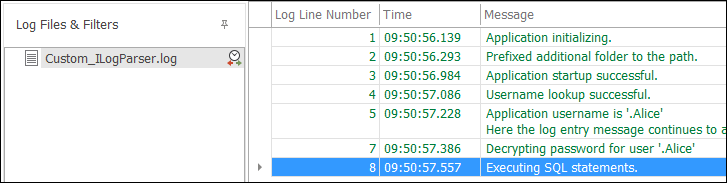
As a temporary solution, you can try explicitly sorting by log line number.
Thanks,
Toby
Thanks for reporting this issue. I assume the time change was made through the "Time Offset" dialog (not internally by your parser).
This sounds like it might be a bug, but I am having trouble recreating it locally. I have just tried to recreate using the sample custom parser and the order of the log entries looks correct. Are you able to provide any more detail?
As a temporary solution, you can try explicitly sorting by log line number.
Thanks,
Toby
Posted on May 21, 2021 at 6:51 AM
Hi Toby,
no the time change is in the log files itself. I did not use the "Time Offset" Dialog.
Example Log File:
09:40 Log Entry
09:50 Log Entry
09:52 Log Entry
09:42 Log Entry <- Here the system time has been changed back
09:45 Log Entry
Yes, sorting by log line number is a workaround.
Regards
Andreas
no the time change is in the log files itself. I did not use the "Time Offset" Dialog.
Example Log File:
09:40 Log Entry
09:50 Log Entry
09:52 Log Entry
09:42 Log Entry <- Here the system time has been changed back
09:45 Log Entry
Yes, sorting by log line number is a workaround.
Regards
Andreas
Posted on May 21, 2021 at 7:02 AM
Can you please confirm that the "After initial load, sort log entries..." setting is not enabled?
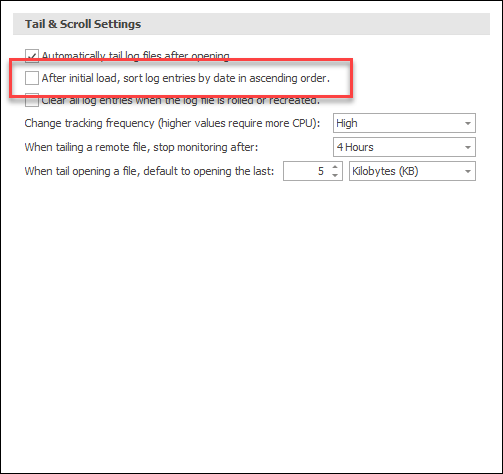
There are situations where sorting should be applied (merge files for example), but the file should normally be loaded as written.
Hope that helps,
Toby
There are situations where sorting should be applied (merge files for example), but the file should normally be loaded as written.
Hope that helps,
Toby
Posted on May 21, 2021 at 7:45 AM
Hi Toby,
this setting was activated. After deselecting, the log entries are in correct order.
Does this setting only influence single log files? Or does it also influence the merging of log files?
Regards
Andreas
this setting was activated. After deselecting, the log entries are in correct order.
Does this setting only influence single log files? Or does it also influence the merging of log files?
Regards
Andreas
Posted on May 21, 2021 at 7:52 AM
Glad that helped.
This setting impacts all 'single' log files opened directly by LogViewPlus. Merge files will always be sorted on load.
Toby
This setting impacts all 'single' log files opened directly by LogViewPlus. Merge files will always be sorted on load.
Toby
This topic is archived and cannot receive new replies.