Logs from our machines are sent over TCP (rather than UDP). They aren't in Syslog format. How do I make a data source that can connect to a TCP server on a specific port?
How do I setup a data source from a TCP stream?

Posted on Aug 31, 2021 at 10:49 PM

Posted on Sep 1, 2021 at 6:54 AM
Hi Iemma,
This is not currently supported, but it is a good idea. I think this is definitely something that should be supported by LogViewPlus.
We have a BETA release planned in the next few days. I will take a look and add support for the next release.
I think one reason we may not have implemented this yet is possible issues around authentication. Authentication will not be supported.
Thanks for bringing this feature to our attention,
Toby
This is not currently supported, but it is a good idea. I think this is definitely something that should be supported by LogViewPlus.
We have a BETA release planned in the next few days. I will take a look and add support for the next release.
I think one reason we may not have implemented this yet is possible issues around authentication. Authentication will not be supported.
Thanks for bringing this feature to our attention,
Toby
Posted on Sep 1, 2021 at 7:23 AM
Hi,
We don't need authentication for our purposes. All machines are on internal networks away from the internet.
Thanks for looking into this - this feature will make LogViewPlus much more useable for us!
We don't need authentication for our purposes. All machines are on internal networks away from the internet.
Thanks for looking into this - this feature will make LogViewPlus much more useable for us!
Posted on Sep 7, 2021 at 1:10 PM
Hi Chris,
I just wanted to let you know that we have now released LogViewPlus 2.5.34 as a BETA release which includes a new TCP listener datasouce:
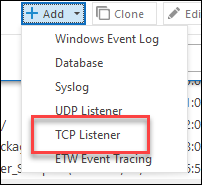
The listener is very similar to the UDP listener in that it does not do much more than open a connection to the server and listen for data. It supports no authentication or handshaking mechanisms. If the server is unavailable, the client will poll for connectivity.
Documentation is still pending, but I think the configuration is mostly self explanatory. Please do let me know if something does not make sense.
Hope that helps,
Toby
I just wanted to let you know that we have now released LogViewPlus 2.5.34 as a BETA release which includes a new TCP listener datasouce:
The listener is very similar to the UDP listener in that it does not do much more than open a connection to the server and listen for data. It supports no authentication or handshaking mechanisms. If the server is unavailable, the client will poll for connectivity.
Documentation is still pending, but I think the configuration is mostly self explanatory. Please do let me know if something does not make sense.
Hope that helps,
Toby
Posted on Sep 7, 2021 at 2:14 PM
Hi Toby,
I'm keen to try it, but that link takes me to the download page for 2.5.32 - do you have a link to the beta please?
Thanks,
Chris
I'm keen to try it, but that link takes me to the download page for 2.5.32 - do you have a link to the beta please?
Thanks,
Chris
Posted on Sep 7, 2021 at 3:46 PM
Hi Chris,
The BETA link is there on the download page. You may need to refresh your browser. If the page is cached, it may not detect the updated link.
Toby
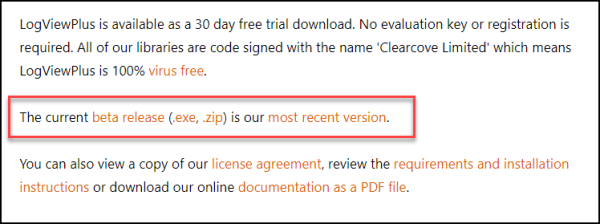
The BETA link is there on the download page. You may need to refresh your browser. If the page is cached, it may not detect the updated link.
Toby
Posted on Sep 7, 2021 at 9:55 PM
Hi Toby,
The logging works well - thanks!
I haven't found a way to close the TCP connection and keep the logging window open. Normal operation is as shown:
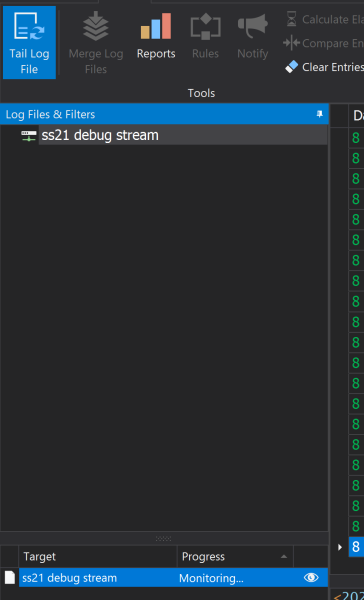
When I right click on Monitoring and choose Cancel.
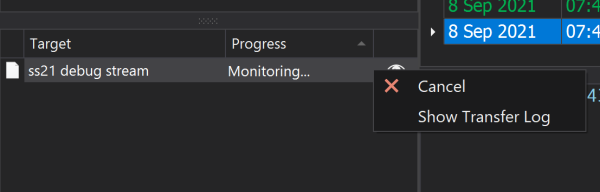
It looks like the TCP connection should be closed (as the target goes away):
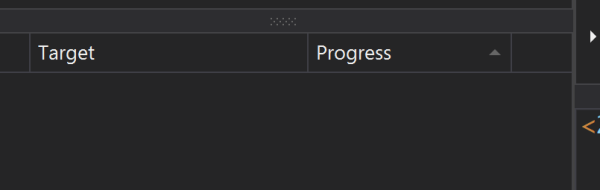
But new log entries keep appearing.
Is there a way to open and close the TCP connection as I desire, whilst keeping the log entries displayed?
The Tail Log File button does a good thing by just pausing the display but continuing the capture - which is sometimes what you want. Sometimes you want to disconnect the TCP connection completely (so that some other process can connect for a while) and then establish the connection again - is there a way to do this?
Thanks,
Chris
The logging works well - thanks!
I haven't found a way to close the TCP connection and keep the logging window open. Normal operation is as shown:
When I right click on Monitoring and choose Cancel.
It looks like the TCP connection should be closed (as the target goes away):
But new log entries keep appearing.
Is there a way to open and close the TCP connection as I desire, whilst keeping the log entries displayed?
The Tail Log File button does a good thing by just pausing the display but continuing the capture - which is sometimes what you want. Sometimes you want to disconnect the TCP connection completely (so that some other process can connect for a while) and then establish the connection again - is there a way to do this?
Thanks,
Chris
Posted on Sep 8, 2021 at 5:43 AM
Hi Chris,
Glad to hear the new adapter is working well. ...mostly anyway. :-)
Thanks for bringing this problem to our attention. The TCP Listener has a lot of redundancy built in to withstand server down time. I suspect this redundancy is interfering with the ability to cancel the connection. I will take a look and get back to you.
Toby
Glad to hear the new adapter is working well. ...mostly anyway. :-)
Thanks for bringing this problem to our attention. The TCP Listener has a lot of redundancy built in to withstand server down time. I suspect this redundancy is interfering with the ability to cancel the connection. I will take a look and get back to you.
Toby
Posted on Sep 9, 2021 at 8:49 AM
Hi Chris,
We have just released LogViewPlus v2.5.35 as a BETA release. This release resolves the transfer cancellation issue highlighted above.
Hope that helps. Please let me know if you have any further questions or issues.
Toby
We have just released LogViewPlus v2.5.35 as a BETA release. This release resolves the transfer cancellation issue highlighted above.
Hope that helps. Please let me know if you have any further questions or issues.
Toby
Posted on Sep 9, 2021 at 10:08 PM
Hi Toby,
Works great - thanks so much for being exceedingly responsive about this!
Chris
Works great - thanks so much for being exceedingly responsive about this!
Chris
Posted on Sep 10, 2021 at 5:49 AM
Glad to hear that resolved the problem. Please let me know if you have any further questions or issues.
Toby
Toby
This topic is archived and cannot receive new replies.