I am having trouble parsing a MySQL log file. A sample log entry might look like:
# Time: 2019-06-01T07:35:37.564219Z
# User@Host: user[user] @ localhost [] Id: 70218
# Query_time: 0.026542 Lock_time: 0.000222 Rows_sent: 1 Rows_examined: 19608
select * from MyTable
How can I configure LogViewPlus to parse this file?
Parsing MySql Log File

Posted on Jun 2, 2019 at 1:09 PM

Posted on Jun 2, 2019 at 1:17 PM
Hi,
So, this is not an easy file to parse as the ParserWizard cannot handle the new line very well. However, you can parse the file by configuring it manually. I am using the PatternParser with the configuration:
# Time: %d{yyyy-MM-ddTHH:mm:ss.ffffffZ}\n# User@Host: %S{User Info}\n# Query_time: %S{Query Time}\n%m%n
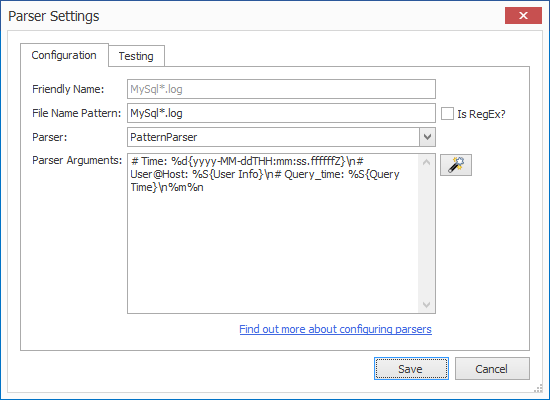
If you wanted, you can probably break out some of the User Info and Query Time fields – but be aware that LogViewPlus cannot process optional fields (data that is written sometimes).
Hope that helps. Let me know if you continue to have problems.
Thanks,
Toby
So, this is not an easy file to parse as the ParserWizard cannot handle the new line very well. However, you can parse the file by configuring it manually. I am using the PatternParser with the configuration:
# Time: %d{yyyy-MM-ddTHH:mm:ss.ffffffZ}\n# User@Host: %S{User Info}\n# Query_time: %S{Query Time}\n%m%n
If you wanted, you can probably break out some of the User Info and Query Time fields – but be aware that LogViewPlus cannot process optional fields (data that is written sometimes).
Hope that helps. Let me know if you continue to have problems.
Thanks,
Toby

Posted on Jun 3, 2019 at 3:45 PM
LogViewPlus Support - 6/2/2019
Hi,
So, this is not an easy file to parse as the ParserWizard cannot handle the new line very well. However, you can parse the file by configuring it manually. I am using the PatternParser with the configuration:
# Time: %d{yyyy-MM-ddTHH:mm:ss.ffffffZ}\n# User@Host: %S{User Info}\n# Query_time: %S{Query Time}\n%m%n
If you wanted, you can probably break out some of the User Info and Query Time fields – but be aware that LogViewPlus cannot process optional fields (data that is written sometimes).
Hope that helps. Let me know if you continue to have problems.
Thanks,
Toby
This is very useful. It works perfectly with the PatternParser. I have tweaked it slightly to get further insight into the fields reported in the file. Very intuitive to use...
# Time: %d{yyyy-MM-ddTHH:mm:ss.ffffffZ}\n# User@Host: %S{User Info}\n# Query_time: %s{Query Time} Lock_time: %s{Lock Time} Rows_sent: %s{Rows sent} Rows_examined: %s{Rows examined}\n%m%n
Similarly, I have created another parser for the normal MYSQL log
%d{yyyy-MM-ddTHH:mm:ss.ffffffZ}\t %s{order} %s{command}\t%S{query}%n
Using them both together in the combined view is turning out super powerful in order to find out performance issues in my backend... I cannot thank Toby enough.
Posted on Jun 3, 2019 at 6:16 PM
Nice one Jon - thanks for the update!
Toby
Toby
This topic is archived and cannot receive new replies.