In a merged view, I would like to be able to quickly hide messages from one of the merged files, and then show them again, without having to create a new merged view. For example, if I merge 4 log files, I might want to quickly hide messages from one of those files, and then show them again. If the log files included in the merge were listed in the tree on the left under the merge, and those files had check boxes which set their visibility, that would be perfect.
Here's an example of what the "Log files & Filters" might look like - here I have a merge called "My merge" using file1, file2, file3 and file4, and I have temporarily hidden the messages from file 3 by unchecking the check box next to file 3
my merge
All Log Levels
X file1
X file2
file3
X file4
Be able to quickly hide messages for a specific log file in a merged view

Posted on Dec 8, 2023 at 4:50 PM

Posted on Dec 9, 2023 at 11:02 AM
You can achieve this result relatively easily by filtering on the Log File column.
First, add the column to the view:
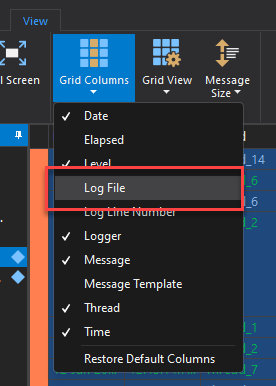
Then right-click on the new Log File column and select 'Find by Value':
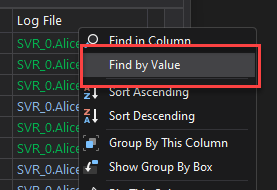
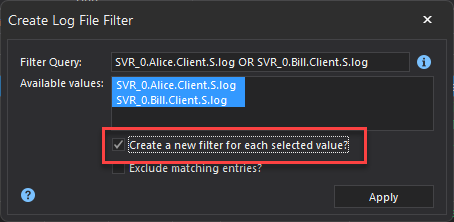
Depending on your goals, you could then select one or more like files and merge them into a single filter, or create a separate filter for each. In this example, I will create a separate filter for each log file:
Finally, use the 'Invert' command (Ctrl+I) to remove the selected filter from the view:
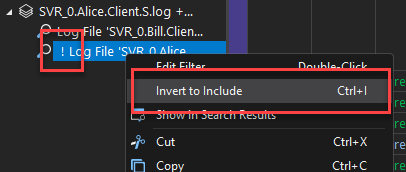
Notice that when you do this, the filter will be prefixed with an exclamation point (!). This signifies that items matched by the filter will not be displayed. The result should be a filter which shows everything except for log entries from the filtered log file.
Hope that helps,
Toby
First, add the column to the view:
Then right-click on the new Log File column and select 'Find by Value':
Depending on your goals, you could then select one or more like files and merge them into a single filter, or create a separate filter for each. In this example, I will create a separate filter for each log file:
Finally, use the 'Invert' command (Ctrl+I) to remove the selected filter from the view:
Notice that when you do this, the filter will be prefixed with an exclamation point (!). This signifies that items matched by the filter will not be displayed. The result should be a filter which shows everything except for log entries from the filtered log file.
Hope that helps,
Toby
Posted on Dec 9, 2023 at 4:03 PM
I tried this and I can create 2 filters like you suggest, and use those to show messages for just one file. I followed your steps - note that in the Create Log File Filter, I see "&" instead of "OR" like this:
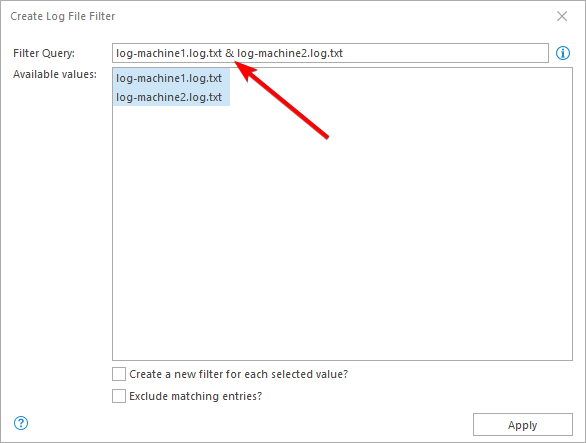
Still, I can create the filters.
If I click on one of the filters and use Ctrl+I to invert it, it doesn't seem to work, though - here I have inverted the log-machine2.log.txt filter, and I still see messages from that log file:
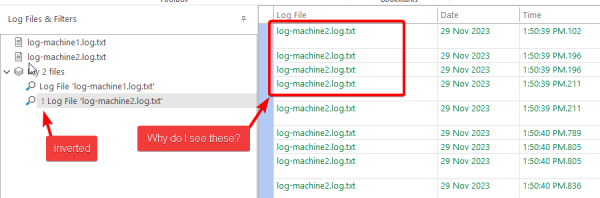
Still, I can create the filters.
If I click on one of the filters and use Ctrl+I to invert it, it doesn't seem to work, though - here I have inverted the log-machine2.log.txt filter, and I still see messages from that log file:
Posted on Dec 9, 2023 at 5:47 PM
What version of LogViewPlus are you using? Does the filter work as expected if you do not 'exclude' it? I just tested locally using the new BETA version and the behaviour is as expected.
The & / OR notation is a change in the latest BETA. We made this change because you will be searching for A OR B, not A & B. This is a naming change only and does not impact behaviour.
The & / OR notation is a change in the latest BETA. We made this change because you will be searching for A OR B, not A & B. This is a naming change only and does not impact behaviour.
Posted on Dec 21, 2023 at 2:10 AM
I am using Version 3.0.22 and yes, the filter works if I do not 'exclude' it.
Posted on Dec 21, 2023 at 8:17 AM
Can you please try again with the latest version? v3.0.30 was released last week as an advanced BETA. We have plans to release v3.1 very soon.
Posted on Dec 28, 2023 at 4:45 PM
Yes, it works in 3.0.30.
Thanks
Thanks
Posted on Dec 28, 2023 at 6:45 PM
Glad to hear it - thanks for letting me know!
This topic is archived and cannot receive new replies.