New user evaluating the program.
When I go to the Report tab the only option is 'Show Dashboards'. But when I click on that I get the following error:
Cannot show dashboards. Distinct configuration ID not found.
Am I doing something wrong?
Thanks,
Can't open or use Dashboard functionality

Posted on May 26, 2024 at 4:27 AM

Posted on May 26, 2024 at 9:33 AM
Hi Indy,
The problem here is that you are using a generic parser to process your log file - probably the default Basic Parser configured to handle *.log files.
Dashboards are associated with your parser configuration. It doesn't really make sense to associate something specific to the current log file (the dashboard) with a generic parser configuration (all *.log files).
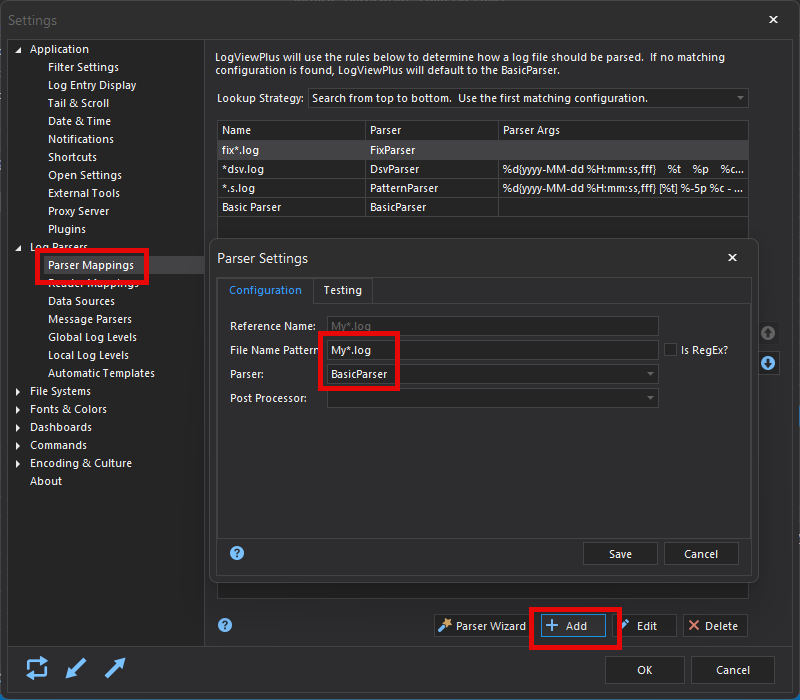
Instead, you will need a new parser configuration. This could be as simple as associating My*.log with the Basic Parser:
If you are new to LogViewPlus, it may be worth watching this quick video on parser configuration.
Hope that helps,
Toby
The problem here is that you are using a generic parser to process your log file - probably the default Basic Parser configured to handle *.log files.
Dashboards are associated with your parser configuration. It doesn't really make sense to associate something specific to the current log file (the dashboard) with a generic parser configuration (all *.log files).
Instead, you will need a new parser configuration. This could be as simple as associating My*.log with the Basic Parser:
If you are new to LogViewPlus, it may be worth watching this quick video on parser configuration.
Hope that helps,
Toby
Posted on May 26, 2024 at 2:16 PM
Hi Toby - thank you for the help.
I believe I do have a parser configuration setup:
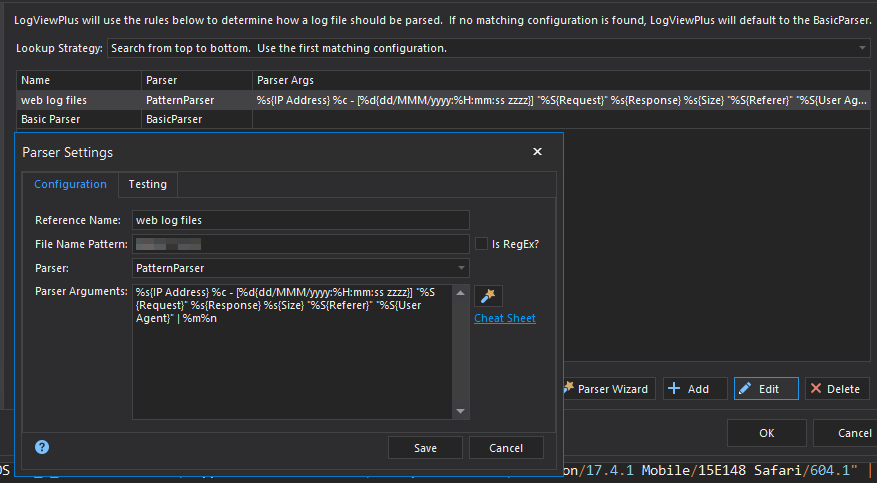
I'm analyzing access logs for a website. When I first loaded the log files it automatically created a parser I believe. I took that one and made some edits to add the column names.
Is there anything else I should check?
I believe I do have a parser configuration setup:
I'm analyzing access logs for a website. When I first loaded the log files it automatically created a parser I believe. I took that one and made some edits to add the column names.
Is there anything else I should check?
Posted on May 26, 2024 at 3:15 PM
Update - it is working for me now (and I believe I understand what was happening before - user error on my part).
Thanks for your help.
Thanks for your help.
Posted on May 26, 2024 at 3:42 PM
Glad to hear you got it working Indy - thanks for letting me know! :)
This topic is archived and cannot receive new replies.