Would it be possible to render the escaped new line chars as new lines so that reading data that contains them is much clearer?
Currently they appear as \n and \r\n in the JSON values.
IN JSON Pretty-Print render escaped chars in the JSON values

Posted on Mar 13, 2025 at 7:28 PM
Posted on Mar 13, 2025 at 7:33 PM
i believe the list of all chars that require attention are:
- \" (double quote)
- \\ (backslash)
- \/ (forward slash)
- \b (backspace)
- \f (form feed)
- \n (new line)
- \r (carriage return)
- \t (horizontal tab)

Posted on Mar 14, 2025 at 9:49 AM
Hi Miket,
Thanks for the feedback.
I am not sure if this feature would be helpful for all users. Some users just want to see the JSON values as written. Also, if I use a sample JSON entry like:
I can paste that into some of the JSON pretty print tools available on line. Some of those tools also do not escape the characters.
Thanks,
Toby
Thanks for the feedback.
I am not sure if this feature would be helpful for all users. Some users just want to see the JSON values as written. Also, if I use a sample JSON entry like:
{"Key": "\"Hello\r\n\tWorld!\"" }I can paste that into some of the JSON pretty print tools available on line. Some of those tools also do not escape the characters.
Thanks,
Toby
Posted on Mar 14, 2025 at 3:21 PM
I totally agree that it most other online JSON prety-print services will render the escape characters as they are within the JSON. but i'm asking if this could be added as a feature perhaps on some sort of toggle option like the word wrap feature?
Iit would make reading of things like stack traces in the logs so much easier for us. having the line breaks in the right place enhances readability no end.
Iit would make reading of things like stack traces in the logs so much easier for us. having the line breaks in the right place enhances readability no end.
Posted on Mar 15, 2025 at 11:59 AM
Thanks for the feedback. I can see where this would be helpful when viewing something like stack trace. Let me take a look and see what we can do for the next release.
Thanks again,
Toby
Thanks again,
Toby
Posted on Mar 27, 2025 at 8:27 PM
Hi Michael,
I just wanted to let you know that we have now released LogViewPlus v3.1.19 as a BETA release.
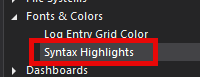
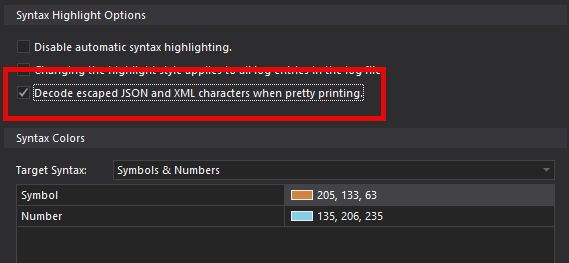
This release addresses the issue with escape characters discussed above. For this to work, you will need to opt into escape character processing. This setting can be found under Syntax Highlights:
Hope that helps,
Toby
I just wanted to let you know that we have now released LogViewPlus v3.1.19 as a BETA release.
This release addresses the issue with escape characters discussed above. For this to work, you will need to opt into escape character processing. This setting can be found under Syntax Highlights:
Hope that helps,
Toby
This topic is archived and cannot receive new replies.