I monitor a couple of servers, reading logs from them. I have dev, test and production servers. All of them have the same file names for logs. Is there a way to automatically modify displayed file name in workspace depends on a workspace or location?
Log Files & Filters panel configuration

Posted on Jul 31, 2019 at 10:32 AM

Posted on Jul 31, 2019 at 12:20 PM
Hi Marcin,
You can manually rename files and this will not impact the underlying file name but, unfortunately, there is no way to do this automatically.
I think this is a good idea and I will have a think about how this feature might work. The trick is implementing it without overcomplicating the application.
Thanks for the feedback!
Toby
You can manually rename files and this will not impact the underlying file name but, unfortunately, there is no way to do this automatically.
I think this is a good idea and I will have a think about how this feature might work. The trick is implementing it without overcomplicating the application.
Thanks for the feedback!
Toby
Posted on Aug 1, 2019 at 7:54 PM
Hi Marcin,
I have been giving this some thought. I was thinking that we could add the ability to right click on a file and assign it to a group which would then act like a folder in the Workspace view. Groups could be preset in settings so this operation can be done in three clicks.
It is not automatic, but I think it is a step in the right direction. Would this solution work for you?
Thanks,
Toby
I have been giving this some thought. I was thinking that we could add the ability to right click on a file and assign it to a group which would then act like a folder in the Workspace view. Groups could be preset in settings so this operation can be done in three clicks.
It is not automatic, but I think it is a step in the right direction. Would this solution work for you?
Thanks,
Toby
Posted on Aug 2, 2019 at 9:16 AM
until this grouping will be saved in workspace yes.
So to clarify, I open logs in different locations, I group them and saving as one workspace.
This will help me lots, as often running a couple of servers logs the same time from different locations and comparing entries.
So to clarify, I open logs in different locations, I group them and saving as one workspace.
This will help me lots, as often running a couple of servers logs the same time from different locations and comparing entries.
Posted on Sep 12, 2019 at 6:27 AM
Hi Marcin,
I just wanted to let you know that the grouping feature discussed above is now available in our beta release.
You can find the feature in the log file context menu:
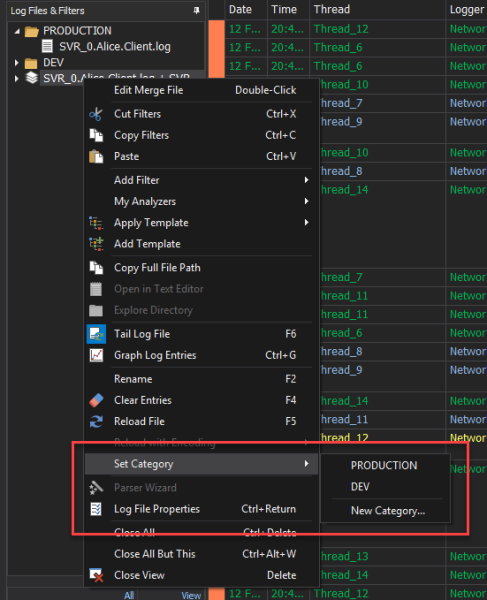
Hope that helps. Please let me know if you have any further issues / thoughts / comments.
Thanks,
Toby
I just wanted to let you know that the grouping feature discussed above is now available in our beta release.
You can find the feature in the log file context menu:
Hope that helps. Please let me know if you have any further issues / thoughts / comments.
Thanks,
Toby
This topic is archived and cannot receive new replies.