My file looks like below:
{"deviceId":"abcd","idpuser":"jp","level":"debug","message":"Host found","osarch":"x64","osplatform":"windows","timestamp":"2020-01-21T21:42:52.458Z","tnid":"aaa","type":"cd","username":"NT AUTHORITY\\SYSTEM","version":"1.3.0.cc"}
{"deviceId":"abcd","idpuser":"jp","level":"debug","message":"Read packet f55495","osarch":"x64","osplatform":"windows","timestamp":"2020-01-21T21:42:52.458Z","tnid":"aaa","type":"cd","username":"NT AUTHORITY\\SYSTEM","version":"1.3.0.cc"}
I tried to use json parser as below:
{
"deviceId":"id",
"message":"msg"
}
When I try to test the parser config, I get an error : "Unable to parse sample log entry. No records were parsed. When this problem occurs, it is usually because of a bad configuration."
Can you help with the parsing?
JSON parser not working

Posted on Jan 22, 2020 at 6:59 PM

Posted on Jan 22, 2020 at 8:24 PM
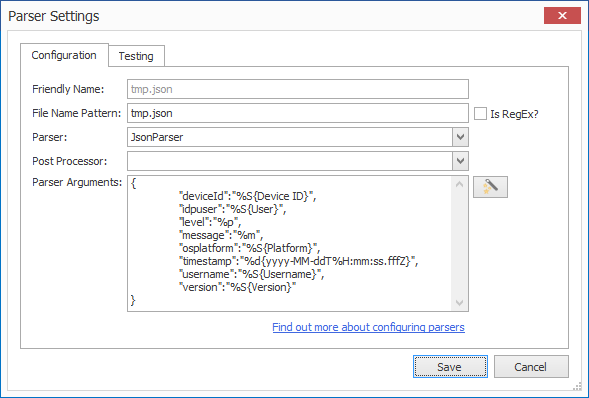
Hi - always happy to help with parser configurations. In this case, I can parse the file with JsonParser using the pattern:
This gives me....
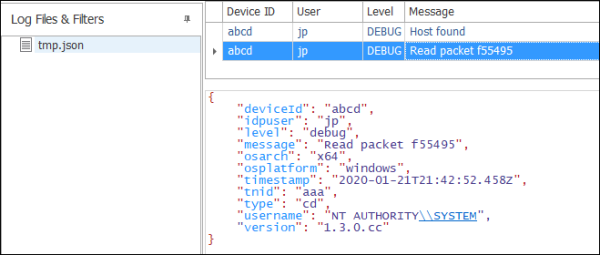
Note that I have intentionally left some fields out. To add them, just us use a conversion specifier similar to "%S{ColumnName}".
Hope that helps. Please let me know if you have any further questions or issues.
Toby
{
    "deviceId":"%S{Device ID}",
    "idpuser":"%S{User}",
    "level":"%p",
    "message":"%m",
    "osplatform":"%S{Platform}",
    "timestamp":"%d{yyyy-MM-ddT%H:mm:ss.fffZ}",
    "username":"%S{Username}",
    "version":"%S{Version}"
}
This gives me....
Note that I have intentionally left some fields out. To add them, just us use a conversion specifier similar to "%S{ColumnName}".
Hope that helps. Please let me know if you have any further questions or issues.
Toby
Posted on Jan 22, 2020 at 9:44 PM
awesome, that worked. Thank you for your help.
Posted on Jan 23, 2020 at 7:06 AM
Glad you got it working - thanks for letting me know!
Toby
Toby
This topic is archived and cannot receive new replies.