Hello,I've created a custom parser for my log files and it works perfect if I doeverything according to instruction. But seems like it's not possible to shareit (*.dll file) with other team members. They put this file to AppDatadirectory (folder with plugins) but LogViewPlus doesn't see it even in Pluginssection of settings. However this file appears in settings after the build fromVisual Studio. Is it possible to share this custom parser with other teammembers without deploying it on each local machine?
custom parser not loading

Posted on Dec 30, 2018 at 9:51 AM
Posted on Jan 2, 2019 at 6:28 PM
It's working now - thanks.
I have two solutions for this and maybe it also will be useful for you to handle it somehow. I'm attaching the screenshot with the first solution. The point is that after transferring the parser, Windows blocks it and therefore the file is closed
for usage. So once it's unblocked everything works fine even with newer versions of .Net framework (I tried 4.6.1 parser version with the current version of LogViewPlus).
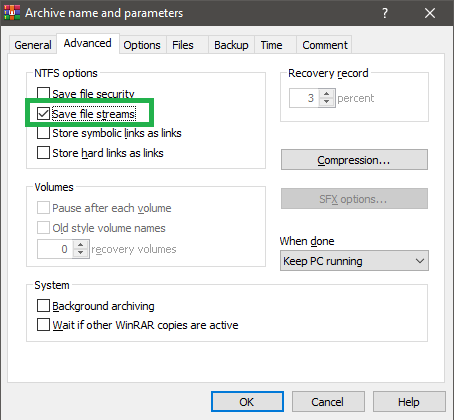
Another solution - to use WinRAR archiver for packing the parser BUT (Important!) with an option "Save file streams" (screenshot is attached). Then once it's unpacked it works also fine. 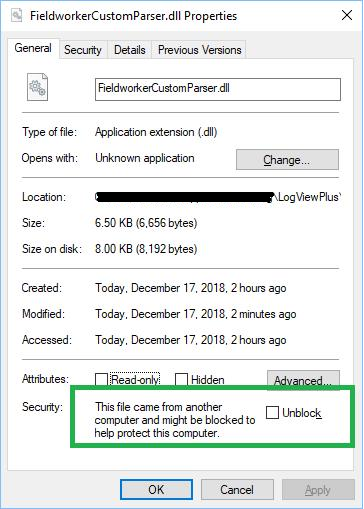

Posted on Jan 2, 2019 at 6:29 PM
Glad to hear you got it working - thanks for letting me know!
This topic is archived and cannot receive new replies.