It looks like whenever <GetRolesForUser> is in my log file LOGview just stops reading the log. It will show all the log entries up until it finds an entry with <GetRolesForUser> inside it and then just stops. If I delete <GetRolesForUser> out of the log file, it will show the entry info and continue on until it finds another entry with <GetRolesForUser> in it.
Is there a way to get the parser to ignore <GetRolesForUser> ?
XML Parser can't read data in log

Posted on Jun 24, 2020 at 11:08 PM
Posted on Jun 24, 2020 at 11:29 PM
After taking another look it seems to have more to do with the <>. If I have a line in my data like
Web.Modules.ModuleManagerService.c.<bla>b__6_4(PortalModule a, DataTable b, DataRow c)
It will get stuck on <bla>
Web.Modules.ModuleManagerService.c.<bla>b__6_4(PortalModule a, DataTable b, DataRow c)
It will get stuck on <bla>

Posted on Jun 25, 2020 at 4:58 AM
Hi,
Thanks for reporting this issue.
It sounds like your log entries are not valid XML. For example, a <bla> tag should have a closing </bla> tag. Is this the case? It might help to use an online XML validator.
Thanks,
Toby
Thanks for reporting this issue.
It sounds like your log entries are not valid XML. For example, a <bla> tag should have a closing </bla> tag. Is this the case? It might help to use an online XML validator.
Thanks,
Toby
Posted on Jun 25, 2020 at 12:29 PM
Hey Toby
It is bad XML, I figured that. What I was hoping is your program had a way of ignoring data between a particular section like
Ignore anything between the <Exception></Exception>
<Exception>
ModuleManagerService.<>c.<Get>b__6_8(PortalModule a, DataTable b, DataRow c)
</Exception>
I'm going to guess by your reply that's a hard no.
It is bad XML, I figured that. What I was hoping is your program had a way of ignoring data between a particular section like
Ignore anything between the <Exception></Exception>
<Exception>
ModuleManagerService.<>c.<Get>b__6_8(PortalModule a, DataTable b, DataRow c)
</Exception>
I'm going to guess by your reply that's a hard no.
Posted on Jun 25, 2020 at 12:38 PM
Unfortunately - this is currently unsupported. The XmlParser expects log entries to be valid XML.
Have you tried configuring a PatternParser? If you could send me a sample log entry - I might be able to help.
Have you tried configuring a PatternParser? If you could send me a sample log entry - I might be able to help.
Posted on Jun 25, 2020 at 1:05 PM
That would be great! If you can figure out how to get it to read something similar to this, I'll move off the trial version today. You can see where it gets stuck.
<LogEntry>
<LogType>Error</LogType>
<Timestamp>2020-06-23 02:00:01-05:00</Timestamp>
<UserID>abc</UserID>
<AuthorizationUser><![CDATA[joe]]></AuthorizationUser>
<Message><![CDATA[Error while loading a Service for the module]]></Message>
<Exception>
<
]]></Exception>
<ModuleName>bla</ModuleName>
</LogEntry>
<LogEntry>
<LogType>Error</LogType>
<Timestamp>2020-06-23 02:00:01-05:00</Timestamp>
<UserID>abc</UserID>
<AuthorizationUser><![CDATA[joe]]></AuthorizationUser>
<Message><![CDATA[Error while loading a Service for the module]]></Message>
<Exception>
<
]]></Exception>
<ModuleName>bla</ModuleName>
</LogEntry>
Posted on Jun 25, 2020 at 4:21 PM
Your log entry is valid XML and therefore should be parsed with the XmlParser. The 'invalid' data we discussed above is actually inside of a CDATA tag - which means the entry is completely valid.
Unfortunately, it appears that CDATA sections are not currently supported. This is a serious oversight on our part. We will resolve this bug and issue a new release as soon as possible. We should have something for you in the next day or two.
Thanks for bringing this problem to our attention!
Toby
Unfortunately, it appears that CDATA sections are not currently supported. This is a serious oversight on our part. We will resolve this bug and issue a new release as soon as possible. We should have something for you in the next day or two.
Thanks for bringing this problem to our attention!
Toby
Posted on Jun 29, 2020 at 7:37 AM
Hi D,
I just wanted to let you know that we have now released LogViewPlus v2.4.36 as a BETA release.
This release resolves the issue with XML parsing discussed above. You should now be able to parse your file using the XmlParser with the pattern:
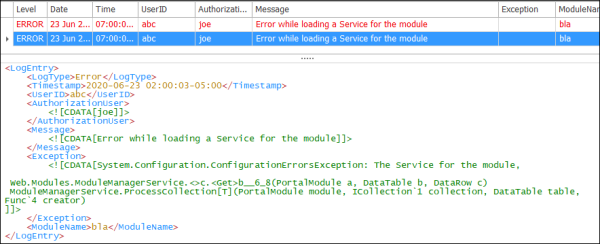
Hope that helps. Please let me know if you have any further questions or issues.
Toby
I just wanted to let you know that we have now released LogViewPlus v2.4.36 as a BETA release.
This release resolves the issue with XML parsing discussed above. You should now be able to parse your file using the XmlParser with the pattern:
<LogEntry>
  <LogType>%p</LogType>
  <Timestamp>%d{yyyy-MM-dd %H:mm:sszzzz}</Timestamp>
  <UserID>%S{UserID}</UserID>
  <AuthorizationUser>%S{AuthorizationUser}</AuthorizationUser>
  <Message>%m</Message>
  <Exception>%S{Exception}</Exception>
  <ModuleName>%S{ModuleName}</ModuleName>
</LogEntry>
Hope that helps. Please let me know if you have any further questions or issues.
Toby
This topic is archived and cannot receive new replies.