Using ssh key for SFTP

Posted on Feb 19, 2021 at 6:24 AM
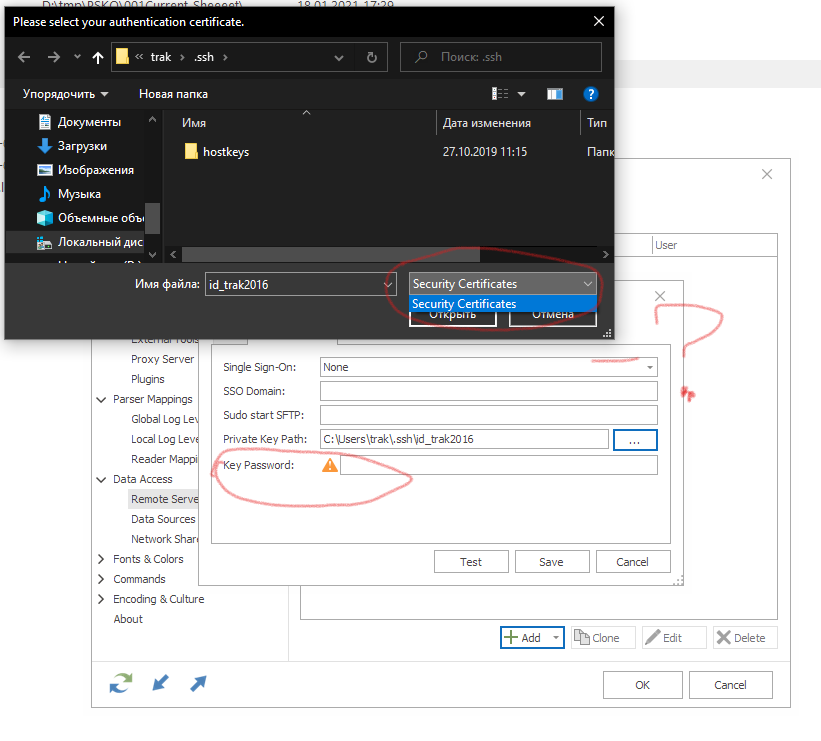
Hi! I have no idea, how to use ssh keys for sftp server. At first,there no "All files" in this drop down menu, and second, I don't use passphrase for my key and can't skip it :(

Posted on Feb 19, 2021 at 7:21 AM
What does the error next to the field say?
Different certificate types need to be processed differently. LogViewPlus supports certificate file types *.ppk, *.p12 and *.pfx. LogViewPlus uses the file extension to make decisions about the type of certificate it needs to handle (*.p12 and *.pfx are considered to be x.509).
I will add the supported file types to the "Security Certificates" prompt. Thanks for pointing this out.
Toby
Different certificate types need to be processed differently. LogViewPlus supports certificate file types *.ppk, *.p12 and *.pfx. LogViewPlus uses the file extension to make decisions about the type of certificate it needs to handle (*.p12 and *.pfx are considered to be x.509).
I will add the supported file types to the "Security Certificates" prompt. Thanks for pointing this out.
Toby
Posted on Feb 19, 2021 at 8:34 AM
oh, i use ssh key pair, but it is not even supported ? I am sorry :)
total 64
-rwxrwxrwx 1 trak trak 1421 Sep 1 2016 authorized_keys
-rwxrwxrwx 1 trak trak 2440 Jun 22 2020 config
drwxrwxrwx 1 trak trak 512 Oct 27 2019 hostkeys
-rwxrwxrwx 1 trak trak 6367 Sep 1 2016 id_rsa
-rwxrwxrwx 1 trak trak 6367 Sep 1 2016 id_trak2016
-rwxrwxrwx 1 trak trak 1421 Sep 1 2016 id_trak2016.pub
-rwxrwxrwx 1 trak trak 35334 Feb 16 10:48 known_hosts
$ file id_trak2016
id_trak2016: PEM RSA private key
total 64
-rwxrwxrwx 1 trak trak 1421 Sep 1 2016 authorized_keys
-rwxrwxrwx 1 trak trak 2440 Jun 22 2020 config
drwxrwxrwx 1 trak trak 512 Oct 27 2019 hostkeys
-rwxrwxrwx 1 trak trak 6367 Sep 1 2016 id_rsa
-rwxrwxrwx 1 trak trak 6367 Sep 1 2016 id_trak2016
-rwxrwxrwx 1 trak trak 1421 Sep 1 2016 id_trak2016.pub
-rwxrwxrwx 1 trak trak 35334 Feb 16 10:48 known_hosts
$ file id_trak2016
id_trak2016: PEM RSA private key
Posted on Feb 19, 2021 at 9:28 AM
We also need to make it more clear what types are supported. I have already added the file types list to the file browser and it will be in the next release - thanks again for pointing this out.
If you have a pem file, I believe you can use PuttyGen to convert it into a ppk file. If you do not have puttygen already installed, I would recommend downloading it from the official site as part of the standard Putty install.
Thanks again,
Toby
If you have a pem file, I believe you can use PuttyGen to convert it into a ppk file. If you do not have puttygen already installed, I would recommend downloading it from the official site as part of the standard Putty install.
Thanks again,
Toby
This topic is archived and cannot receive new replies.