I suspect you are correct which is why I added the additional logging.
Access is a big ask, but if you are happy that would be a massive help. Please feel free to contact me via email.
Files Disappearing

Posted on Aug 7, 2021 at 4:44 PM
Posted on Aug 9, 2021 at 7:49 AM
After connecting to the remote server, the issue was easy to replicate. The problem was a race condition which was resolved in the latest BETA release - LogViewPlus v2.5.32.
Thanks again for your help identifying and resolving this issue Brad!
Toby
Thanks again for your help identifying and resolving this issue Brad!
Toby

Posted on Sep 21, 2024 at 4:08 PM
Circling back to this, three years later, the issue is still ongoing. Every day, files disappear from the Files & Filters pane. The only way to restore the files is to close and reopen the workspace. This happens every day, sometimes several times per day. I know I should have said something long ago, but I guess I just learned to live with it. Nevertheless, it's still extremely frustrating. I'm currently using version 3.1.15.
Posted on Sep 22, 2024 at 4:51 PM
Hi Brad,
This thread had gotten a little unwieldy. The next step for me is to recreate the issue. I remember you giving me server access was the key to fixing this issue last time. Are you having the same issue, or should this be a new thread? I haven't had other reports of "disappearing files", so I think this issue might be specific to your server.
I can say that removing a file from the File & Filters view isn't something that happens very often. The main reason is if the file is being refreshed or rolled. When LogViewPlus detects that a refresh is needed, it closes the existing file and reopens it. Possibly, LogViewPlus is detecting a secenario where the a refresh is needed, but failing to reopen the file. It would be good to know why the file fails to reopen. Have you tried inspecting the transfer log or the server logs?
Thanks,
Toby
This thread had gotten a little unwieldy. The next step for me is to recreate the issue. I remember you giving me server access was the key to fixing this issue last time. Are you having the same issue, or should this be a new thread? I haven't had other reports of "disappearing files", so I think this issue might be specific to your server.
I can say that removing a file from the File & Filters view isn't something that happens very often. The main reason is if the file is being refreshed or rolled. When LogViewPlus detects that a refresh is needed, it closes the existing file and reopens it. Possibly, LogViewPlus is detecting a secenario where the a refresh is needed, but failing to reopen the file. It would be good to know why the file fails to reopen. Have you tried inspecting the transfer log or the server logs?
Thanks,
Toby
Posted on Sep 23, 2024 at 4:37 PM
It's the same issue as before. The transfer log is difficult to work with because it only works the first time I open it. If I open the transfer log, then switch to a different log file, I'm no longer able to view the transfer log after that. Therefore, if a file disappears I have no way of viewing the transfer log to see if anything happened. By default, SFTP transfers aren't logged on the server. I guess I could enable logging, but I'm not sure if this would provide any useful information.
Posted on Sep 23, 2024 at 7:10 PM
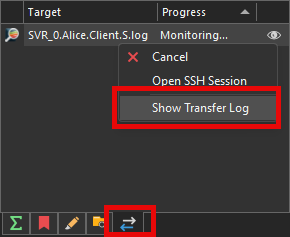
Try viewing the client transfer log from the File Transfers view. Logs are written to disk, so they shouldn't disappear.
Posted on Sep 23, 2024 at 7:17 PM
When I mentioned files disappearing, I was referring to the disappearing log files, which are the basis of this thread, not the transfer log. When I open LVP, I'm able to view the transfer log from the location in your screenshot or from the link in the Log File Properties screen. However, it only works once. If I subsequently view another log file, then try to view the transfer log again, nothing happens. Therefore, the inability to view the transfer log is a separate issue from the topic of this thread.
This topic is archived and cannot receive new replies.