Start automatically with Windows

Posted on Sep 9, 2021 at 4:34 PM
I'd like to request a setting in the Startup Settings section to automatically run LVP after logging in to Windows. I know it's easy enough to do this manually, but I feel that it's cleaner to have the application itself handle adding/removing the registry setting.

Posted on Sep 9, 2021 at 5:10 PM
Thanks for the suggestion Brad.
I think this is a good idea and I can see it working well with some of the existing settings including 'Run in notification area' and 'Open last workspace'.
Let me have a look. I think this should be a small change, so maybe we can squeeze it into the current release cycle.
Thanks again,
Toby
I think this is a good idea and I can see it working well with some of the existing settings including 'Run in notification area' and 'Open last workspace'.
Let me have a look. I think this should be a small change, so maybe we can squeeze it into the current release cycle.
Thanks again,
Toby
Posted on Sep 14, 2021 at 7:21 PM
Hi Brad,
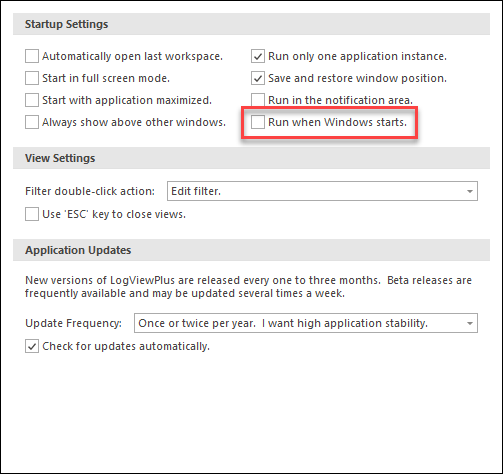
I wanted to let you know that we have just released LogViewPlus v2.5.36 as a BETA release. This version includes a new setting to configure LogViewPlus to run at startup.
Thanks for the suggestion. Hope that helps.
Toby
I wanted to let you know that we have just released LogViewPlus v2.5.36 as a BETA release. This version includes a new setting to configure LogViewPlus to run at startup.
Thanks for the suggestion. Hope that helps.
Toby
Posted on Sep 29, 2021 at 1:21 PM
This works well. However, I have a couple of suggested improvements/fixes:
1. I have the Automatically Open Last Workspace option enabled, but it doesn't work. I just rebooted my computer and LVP opened automatically, but it did not open the last workspace.
2. Could you add an option to open only in the system tray? Having it open automatically is not that convenient, if I then have to manually close it to the tray. The idea is to have it always running unobtrusively in the background.
1. I have the Automatically Open Last Workspace option enabled, but it doesn't work. I just rebooted my computer and LVP opened automatically, but it did not open the last workspace.
2. Could you add an option to open only in the system tray? Having it open automatically is not that convenient, if I then have to manually close it to the tray. The idea is to have it always running unobtrusively in the background.
Posted on Sep 29, 2021 at 7:16 PM
Thanks for the feedback Brad.
Both of these issues surprise me as LogViewPlus should be opening minimized. I will put this on the list to investigate before the next release.
Thanks again,
Toby
Both of these issues surprise me as LogViewPlus should be opening minimized. I will put this on the list to investigate before the next release.
Thanks again,
Toby
Posted on Dec 13, 2021 at 8:42 AM
Hi Brad,
I have taken a look at this issue in the latest beta release - v2.5.47. I was able to recreate the issue locally and the problem should now be resolved.
Thanks for bringing this issue to our attention.
Toby
I have taken a look at this issue in the latest beta release - v2.5.47. I was able to recreate the issue locally and the problem should now be resolved.
Thanks for bringing this issue to our attention.
Toby
This topic is archived and cannot receive new replies.