Love the tool!
Having some problem getting millisecond in the output.
Here's a sample raw line:
2023-02-13 17:55:19,620 INFO [shutdown-hook-0] util.ShutdownHookManager: Deleting directory /mnt/resource/hadoop/yarn/local/usercache/yarn/appcache/application_1676302770109_0016/spark-037df2dd-a2d3-4d8d-aa4a-f5255a21becc
Above, note the , 620 millisecond output.
Under settings | Time Date , I've tried many different options and can't seem to get it right.
Its currently set to this:
%d{yyyy-MM-dd %H:mm:ss.fff}
I've tried numerious variations, including a comma like this :
%d{yyyy-MM-dd %H:mm:ss,fff}
...but the output displayed in the LogViewPlus always seems to truncate the milliseconds and shows the following:
2/13/2023 5:55:19 PM
Any tips greatly appreciated!!
I'm using version 3.0.8
Thanks so much
How to output milliseconds?

Posted on Feb 14, 2023 at 2:55 AM

Posted on Feb 14, 2023 at 4:18 AM
Hi Suaro - glad to hear you are finding LogViewPlus helpful. Thanks for the feedback. :)
I am not sure where you are going wrong, but I am able to get a good parse of the log entry with the configuration pattern:
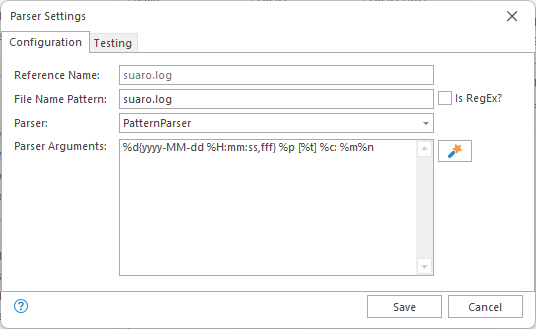
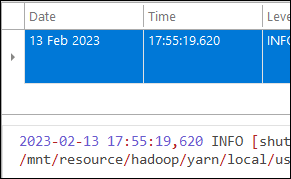
I believe this displays the result you are looking for:
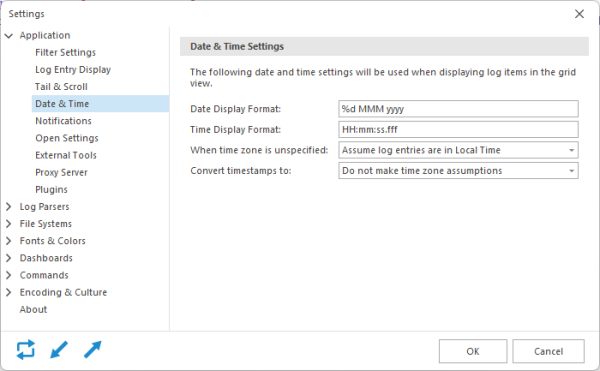
The problem may be in your date time settings. Make sure that your display setting define a millisecond for output. My settings are the default for my current region:
Hope that helps,
Toby
I am not sure where you are going wrong, but I am able to get a good parse of the log entry with the configuration pattern:
%d{yyyy-MM-dd %H:mm:ss,fff} %p [%t] %c: %m%nI believe this displays the result you are looking for:
The problem may be in your date time settings. Make sure that your display setting define a millisecond for output. My settings are the default for my current region:
Hope that helps,
Toby
Posted on Feb 14, 2023 at 7:29 AM
Thank you Toby. I wiped out my existing settings and made the same as what you have above.
Everything works fine now!
Everything works fine now!
Posted on Feb 14, 2023 at 7:33 AM
Glad to hear that helped Suaro - thanks for letting me know!
Toby
Toby
This topic is archived and cannot receive new replies.