This one may be a bug....
When I set my Grid View to One log entry per grid line and then save the workspace, it automatically reverts the current display back to Show message detail. Moreover, the setting doesn't seem to get saved with the workspace when it is saved.
I'm using LogViewPlus 2.3.18.
-Remo
Unable to save workspace with Grid View set to "one log entry per grid line"

Posted on Jul 27, 2019 at 10:30 PM

Posted on Jul 28, 2019 at 6:16 PM
Hi Remo,
This setting is not saved as part of a Workspace. If you want to persist this setting, you will need to set "one log entry per grid line" as the default in application settings.
Please see:
https://www.logviewplus.com/docs/log_entry_display.html
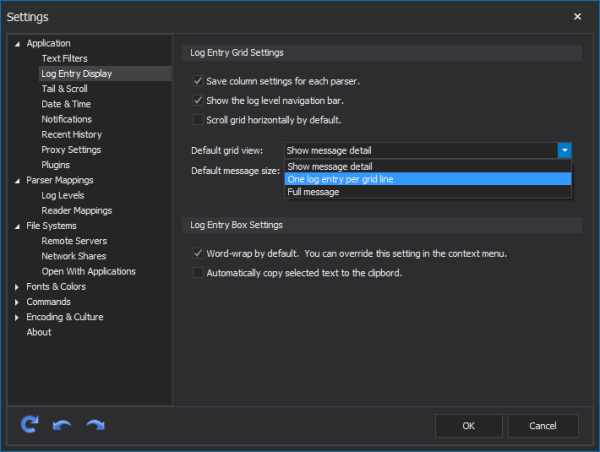
Thanks,
Toby
This setting is not saved as part of a Workspace. If you want to persist this setting, you will need to set "one log entry per grid line" as the default in application settings.
Please see:
https://www.logviewplus.com/docs/log_entry_display.html
Thanks,
Toby
Posted on Jul 29, 2019 at 6:46 PM
LogViewPlus Support - 7/28/2019
Hi Remo,
This setting is not saved as part of a Workspace. If you want to persist this setting, you will need to set "one log entry per grid line" as the default in application settings.
Please see:
https://www.logviewplus.com/docs/log_entry_display.html
Thanks,
Toby
Great. Thank you.
That should work.
This topic is archived and cannot receive new replies.