Hi! When I mark a message I see the entire json message in the details box.That's great, but is there any way to display the line breaks as actual line breaks, instead of \n? If I right click on the message, choose copy cell, and then paste in a text editor I get the message in the right format, but that's a bit cumbersome.
Line breaks in json message

Posted on Nov 18, 2019 at 10:24 PM

Posted on Nov 19, 2019 at 6:43 AM
Hi Magnus,
Sorry - I am not clear on what you are trying to achieve. Do you think you can send me a screenshot?
What you might try is changing the pretty print settings on the view:
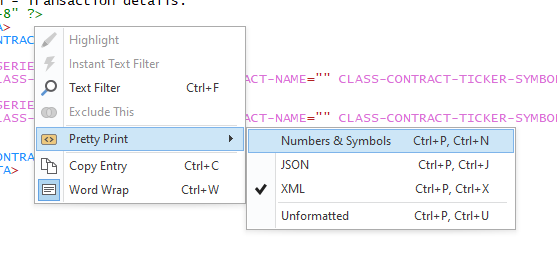
Try the "Numbers & Symbols", JSON, and Unformatted settings. See if one of these achieves the result you want.
If this works for you, then there is an application setting to automatically apply this change to the whole log file. This setting is described here:
https://www.logviewplus.com/docs/syntax_highlights.html
Hope that helps,
Toby
Sorry - I am not clear on what you are trying to achieve. Do you think you can send me a screenshot?
What you might try is changing the pretty print settings on the view:
Try the "Numbers & Symbols", JSON, and Unformatted settings. See if one of these achieves the result you want.
If this works for you, then there is an application setting to automatically apply this change to the whole log file. This setting is described here:
https://www.logviewplus.com/docs/syntax_highlights.html
Hope that helps,
Toby
Posted on Nov 20, 2019 at 6:47 PM
Hi, and thanks for the reply.
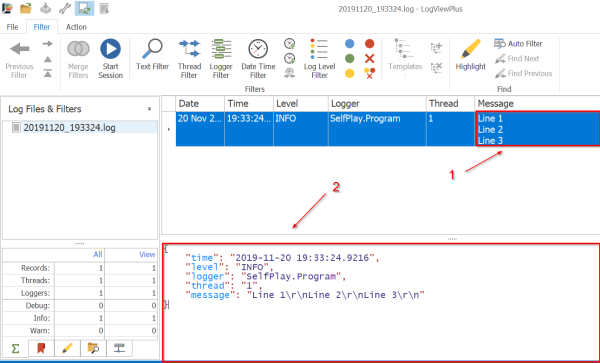
Let me try to explain it better. Many of my log posts have line breaks. In box 1 (see image) it gets nicely formatted as separate lines, but the in box 2 the message is displayed on one line (separated with \r\n). Would it be possible to have separate lines in box 2 as well, or would that be in violation of the json specification? Maybe this problem have its source in how the logs are written, I'm using NLog.
Kind regards
Magnus J
This topic is archived and cannot receive new replies.