Parsing optional columns

Posted on Jun 17, 2020 at 10:21 PM
The logger that my predecessor wrote only writes the exact data passed to it, and does not fill in blanks for unused columns per entry. I don't see any way of handling for something like this in the parser.
For example:
16:58:34.00408    ActorName    Method    LogMessage    LogData
16:58:34.00959    ActorName    Method2    
16:58:34.01260    ActorName    Method3    LogMessage
16:58:34.01310    ActorName    Method    LogMessage    LogData

It's tab delimited, but the number of tabs per newline can vary. What I've been getting is lines not parsing correctly and having a single Logviewplus entry containing multiple actual lines.

Has anyone else experienced this? Is there support for something like this in LVP? I'm working on standardizing the logger to always put 5 tabs, regardless of if there was a Message or Data, but I still need to be able to read old logs right now and it's hard when randomly lines will be missing from the viewer

Posted on Jun 18, 2020 at 5:37 AM
Hi Nzamora,

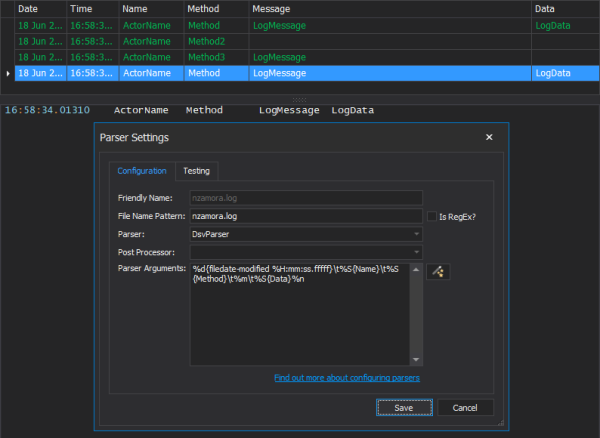
I am able to parse the optional fields in this log file with the DsvParser.  I am using the pattern:
%d{filedate-modified %H:mm:ss.fffff}\t%S{Name}\t%S{Method}\t%m\t%S{Data}%n


For anyone else reading this thread, it is important to note that the PatternParser does not support optional fields.  The PatternParser is more widely used than the DsvParser and this is an issue we frequently see with that parser.  We have some plans to work around this issue with secondary parsing, but this feature is still a few months away.

The 'filedate-modified' flag used above is a bit unusual.  It is described here:
https://www.logviewplus.com/docs/resolve_log_entry_date.html

Hope that helps,

Toby

This topic is closed and cannot receive new replies.