The Transform Text function is amazing, but I almost always want to do just ${Time} ${Message} with Selected Log Entries
Can you please give me the ability to make that configuration the default for Transform Text?
Thanks!
Transform Test Presets

Posted on Aug 24, 2023 at 9:36 PM

Posted on Aug 24, 2023 at 10:39 PM
I think that's a great idea - thanks for the suggestion! Let me take a look and I will see what we can do for the next release.
Thanks again,
Toby
Thanks again,
Toby
Posted on Mar 15, 2024 at 9:27 PM
Reiterating this request, thanks!
Posted on Mar 16, 2024 at 7:51 PM
Thanks for chasing this one.
In the next release, we have added a 'History' menu to the Transform Text and SQL Scratchpad dialogs.
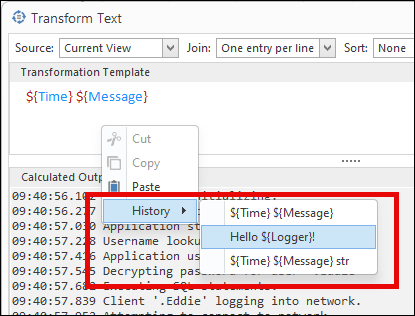
History works by saving the text when the window is closed. Up to seven items will be saved.
We decided on this approach rather than the straight 'default setting' because:
1. We wanted to maintain a simple default which users can use to intuit how the tool can be used.
2. Some users might prefer different defaults to '${Time} ${Message}'.
3. Saving the history addresses a more generic use case.
This feature should be available for the next release in 2-3 weeks. Hope it helps.
Thanks again!
Toby
In the next release, we have added a 'History' menu to the Transform Text and SQL Scratchpad dialogs.
History works by saving the text when the window is closed. Up to seven items will be saved.
We decided on this approach rather than the straight 'default setting' because:
1. We wanted to maintain a simple default which users can use to intuit how the tool can be used.
2. Some users might prefer different defaults to '${Time} ${Message}'.
3. Saving the history addresses a more generic use case.
This feature should be available for the next release in 2-3 weeks. Hope it helps.
Thanks again!
Toby
This topic is archived and cannot receive new replies.