Two questions about viewer

Posted on Apr 17, 2023 at 10:03 AM
Hello

We are evaluating your viewer and we like it but we have two things we would like to know if we can resolve them.

When grouping by thread, threads are not ordered by date using more recent (for ascending order) of the lines composing the thread even if order using date column. It seems that thread are only order alphabatically.

Second is it possible that when a grouped thread is collapsed to display the informations of the first line composing the thread (like message, level etc ....)
Something like that:


Thanks

Posted on Apr 17, 2023 at 10:46 AM
Hi Eric,

Thanks for taking the time to evaluate LogViewPlus.

By default, groups are sorted by record count.  To sort by time instead, just click on the 'Time' column header after the groups have been created.

The data contained within a group may not be accurately represented by the first record.  So we do not currently have plans to expand the information displayed in the group header.

Finally, are you familiar with the thread filter command?
https://www.logviewplus.com/docs/filters.html
https://www.logviewplus.com/docs/value_filter.html

You can use this command to quickly create.a filtered view each thread's activity with the wildcard '*'.

Hope that helps,

Toby
Posted on Apr 17, 2023 at 11:01 AM
Hi

Click on date column after creating thread group does not order the thread groups but only the lines INSIDE each thread.
Threads are sill ordered by name.
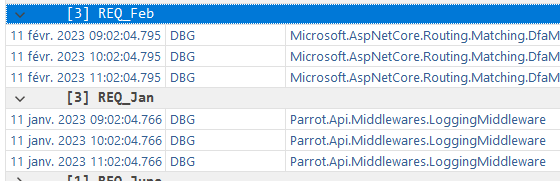
An example feb thread is displayed before jan thread even ordering by date descending (but lines inside threads are correctly ordered)


Posted on Apr 17, 2023 at 11:09 AM
What happens when you sort by the 'Time' column header?  It may be necessary to sort by date first and then manually sort by time.  This can be done by right clicking on the column header and selecting the sort direction.
Posted on Apr 17, 2023 at 11:50 AM
Hi

The same. What ever sort i use after grouping, the group are ordered alphabetically, only lines inside groups are correctly ordered
Posted on Apr 17, 2023 at 1:48 PM
Hi again

We were able too by using your system of external command to change the Thread name in the file before opening it to make the tread name to include information of first line. This is good.

Still this problem of ordering the thread group by date that is a blocker for us.

Hopefully you can find something. ;)

Thanks
Posted on Apr 17, 2023 at 7:44 PM
Hi Eric,

I have been able to recreate this behaviour on my end and can confirm that the grid can only sort group columns by the group name. 

Unfortunately, I don't think we will be able to change this behaviour as it seems to be built into the third-party grid that we are using.

What is it that you are trying to do?  Maybe there is another way to achieve the same goal? 

Thanks,

Toby
Posted on Apr 18, 2023 at 8:01 AM
Hi

We are using Thread to group logs on scope level that is we have in a thread all logs matching a scope call (rest api call).
We want to be able to show the list grouped by scope and the fact groups cannot be sorted by date is not usable to analyze logs.

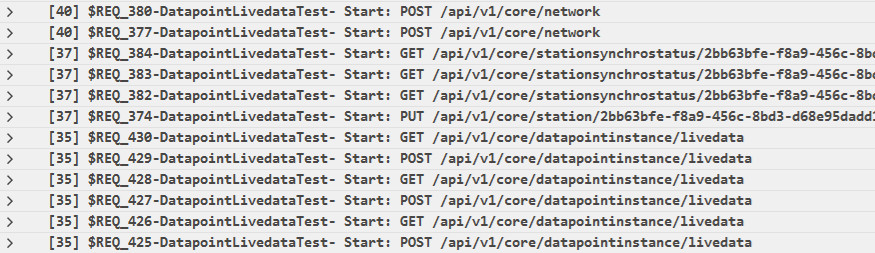
Here is an example

Inside each group you have the logs matching this rest call.

Posted on Apr 18, 2023 at 8:36 AM
What if we could create a set of Thread Filters ordered by date?  One way to do this would be to create the list of filters using a SQL statement.

Would that help?
Posted on Apr 18, 2023 at 8:50 AM
Hi

I cannot say. Tell me what to do so i can verify it matches the need.

But honestly, thread in logs are common and not being able to display them in date ordering in a logs analyzer is a real missing feature in my opinion.
Posted on Apr 18, 2023 at 9:25 AM
Threads are shown in date order by default.  What you are trying to do here is group thread activity while sorting the groups by characteristics of data within a group.  This is a new suggestion for us.  Above I suggested a new feature rather than something you could try right now.  Sorry this was not clear.

I was thinking we could create thread filters in a specified order.  This approach would give users a great deal of flexibility in how filters are created.

For example, you could write a query like:  select Thread from CurrentView order by Timestamp.  Each Thread returned by the query would indicate a new filter to be created.

This suggestion works with filters rather than groups.  This fits better into the model of how LogViewPlus works with data.

Groups in LogViewPlus are more about getting familiar with a dataset.  This is why they are ordered alphabetically and display a record count.  Groups do not feed into other LogViewPlus actions such as sub filters or reports.
Posted on Apr 18, 2023 at 1:51 PM
Hi again

We find a workaround.
As i said previously we add an external command in your tool (to process file before opening it) that change threads to include message of first line of each thread to make the threads grouping more readable.

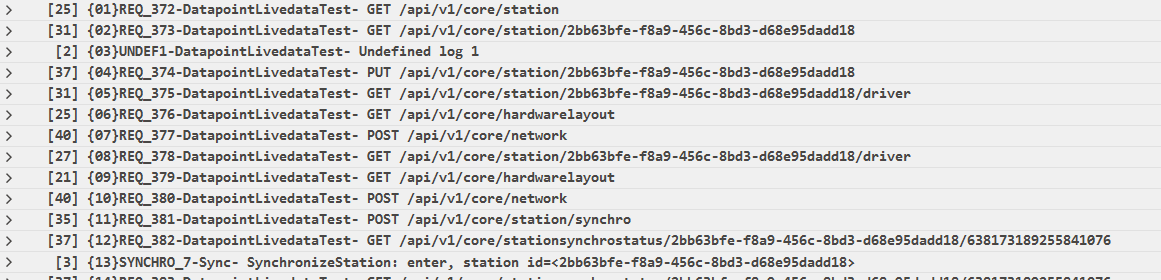
We tune this tool to add a prefix in each thread to force the alphabetically order to follor the date order.
Like this:


The number {xx} is linked to date time :)
This work. Not in the beauty of the art but it works.

We still have an issue that ordering of collapsed thread is ONLY in ascending order (that is here in ascending date) and nothing else.
But at least this makes the job :)


Posted on Apr 18, 2023 at 2:45 PM
Hi again

To come back to your filter story above, do you have any recommendation to have a view, using sql filters, to group lines by Thread but ordered by date ?

Thanks
Posted on Apr 18, 2023 at 5:50 PM
Glad to hear you found a solution Eric - thanks for letting me know!

I am still trying to think of ways to create an ordered list of filters.  I think the best way to work this into the application would be to create a new rule type.  Something like 'Create filters from SQL statement'.  This may be something we could look into for the next release.

This topic is closed and cannot receive new replies.