I would like to see, in a merged view, the messages colored by which log file they came from - not by log level. There is a colored bar on the left of the logging messages which colors like this, but it doesn't seem to be possible to color the messages like this?
Coloring messages by log file

Posted on Dec 8, 2023 at 4:49 PM

Posted on Dec 9, 2023 at 10:50 AM
As you mentioned, the row indicator is our standard approach to distinguishing log files in a merge. If you would like more control, consider applying a custom rule.
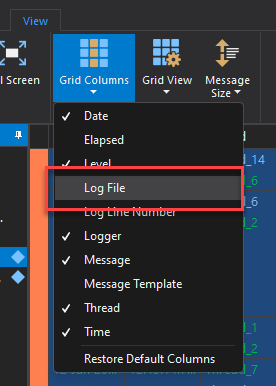
In this case, I would recommend adding the 'Log File' column to the view:
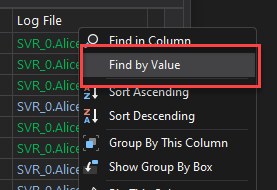
Next, search within the column with a Find By Value filter available from the Column context menu:
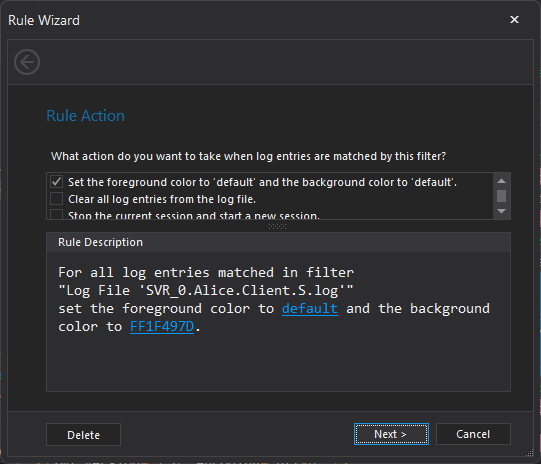
Finally, apply a new colour rule:
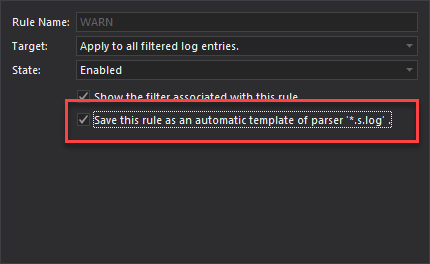
If you would like to apply this rule every time the log file is opened, you can save the rule as an automatic template:
Hope that helps,
Toby
In this case, I would recommend adding the 'Log File' column to the view:
Next, search within the column with a Find By Value filter available from the Column context menu:
Finally, apply a new colour rule:
If you would like to apply this rule every time the log file is opened, you can save the rule as an automatic template:
Hope that helps,
Toby
Posted on Dec 9, 2023 at 4:16 PM
Yes, this works, thanks. I couldn't find the dialog in your last screenshot to save the rule as an automatic template, however.
Posted on Dec 9, 2023 at 5:54 PM
The last screenshot is page 2 of the Rule Wizard. You could also use the Rule Manager which uses the term "Parser Rule" to define an Automatic Template.
Posted on Dec 21, 2023 at 2:10 AM
Thanks
Posted on Dec 21, 2023 at 8:18 AM
Glad that helped - thanks for letting me know! :)
This topic is archived and cannot receive new replies.