hello
recently updated to the latest logviewplus version ,
and have 3 issues (which didnt happen in previous version) :
-everytime i open the app it wont automatically open the last opened workspace
-when i open the workspace i get a dialog to "save configuration" , save button is disabled until i edit the parser
-in my log view i always hide some columns but those appear again everytime i open the app
im on windows 11 fresh install , and installed the app in default directory.
constantly get asked to save configuration and wont save hidden columns

Posted on Apr 30, 2024 at 6:15 PM

Posted on Apr 30, 2024 at 6:35 PM
Hi,
Thanks for reporting this issue. Can you confirm you are using v3.1.6? We have recently released v3.1.9 as a BETA release.
> it wont automatically open the last opened workspace
Is the Open Last Workspace option checked?
> save button is disabled
The save button is disabled on the Save Configuration screen when there is a problem with at least one of the target configurations. Column information is saved with the parser configuration.
It sounds like LogViewPlus is unable to associate the file you are opening with a valid parser configuration. It then attempts to create a new parser, which will need to be saved and will not have the previously saved column information.
Can you send me more details on your existing parsers and the target log file?
Thanks,
Toby
Thanks for reporting this issue. Can you confirm you are using v3.1.6? We have recently released v3.1.9 as a BETA release.
> it wont automatically open the last opened workspace
Is the Open Last Workspace option checked?
> save button is disabled
The save button is disabled on the Save Configuration screen when there is a problem with at least one of the target configurations. Column information is saved with the parser configuration.
It sounds like LogViewPlus is unable to associate the file you are opening with a valid parser configuration. It then attempts to create a new parser, which will need to be saved and will not have the previously saved column information.
Can you send me more details on your existing parsers and the target log file?
Thanks,
Toby
Posted on Apr 30, 2024 at 11:13 PM
hi
im using v3.1.6
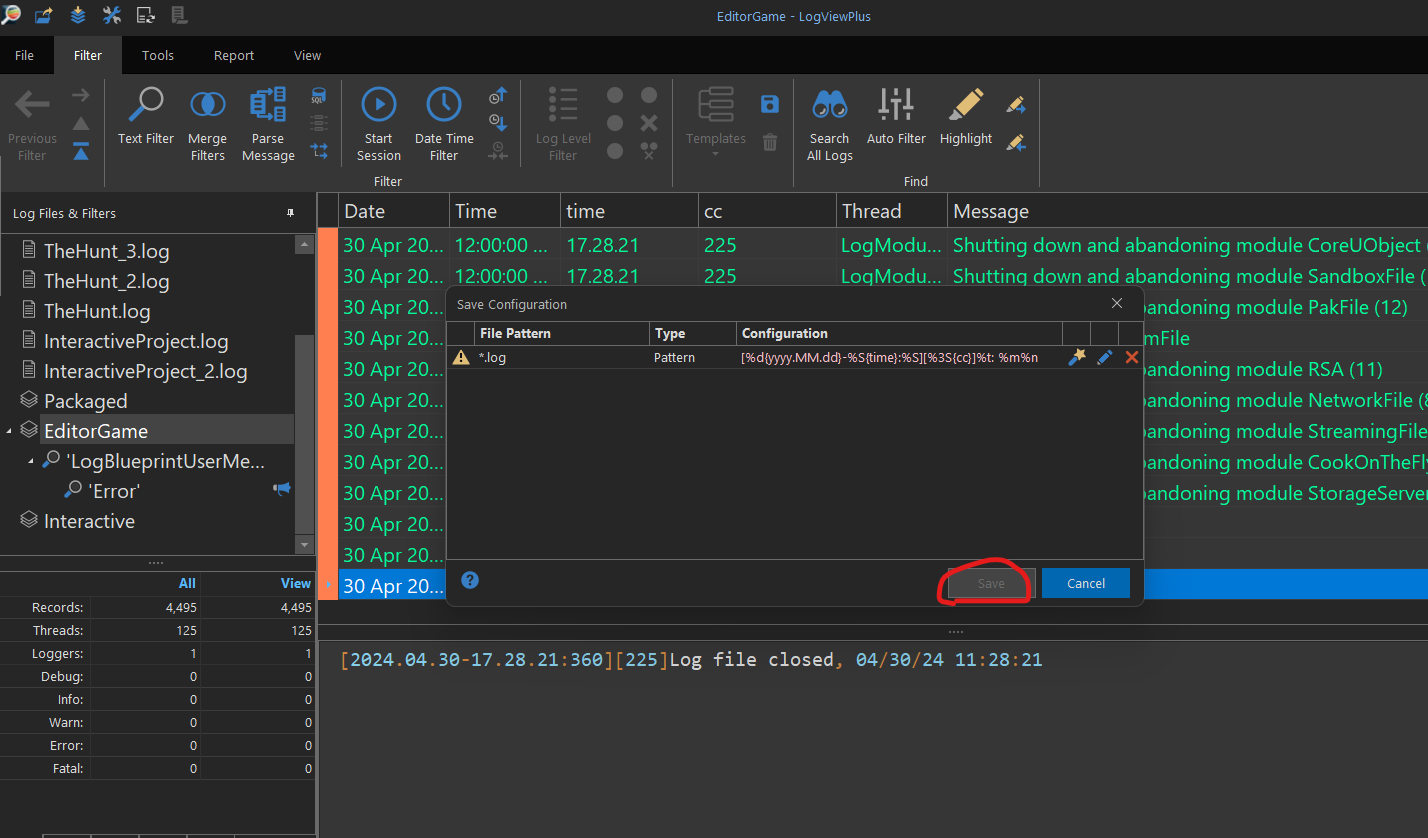
thanks the open last workspace worked but still being greeted by the dialog shown in the screenshot
and only the last column "message" should be shown
you can see the save button is disabled until i edit the configuration of the dialog using the pencil icon.
im using v3.1.6
thanks the open last workspace worked but still being greeted by the dialog shown in the screenshot
and only the last column "message" should be shown
you can see the save button is disabled until i edit the configuration of the dialog using the pencil icon.
Posted on May 1, 2024 at 6:37 AM
To the far left of the Save Configuration screen there is a warning icon. If you click on the image what does it say?
I can see that the file name pattern LogViewPlus has detected is *.log. This is often a poor file name for a custom parser configuration because it it too generic. The file pattern may be part of the problem. If you want to use *.log as a file name pattern, it may be that this needs to be configured manually in parser settings.
It also looks like LogViewPlus has not been able to correctly parse the timestamp. Looking at the image, I think your date specifier should be something like:
Not sure why the timestamp was not detected correctly, but I will look into that.
Hope that helps,
Toby
I can see that the file name pattern LogViewPlus has detected is *.log. This is often a poor file name for a custom parser configuration because it it too generic. The file pattern may be part of the problem. If you want to use *.log as a file name pattern, it may be that this needs to be configured manually in parser settings.
It also looks like LogViewPlus has not been able to correctly parse the timestamp. Looking at the image, I think your date specifier should be something like:
%d{yyyy.MM.dd-HH.mm.ss:fff}Not sure why the timestamp was not detected correctly, but I will look into that.
Hope that helps,
Toby
Posted on May 1, 2024 at 8:41 PM
Hi,
here is the message from the warning icon
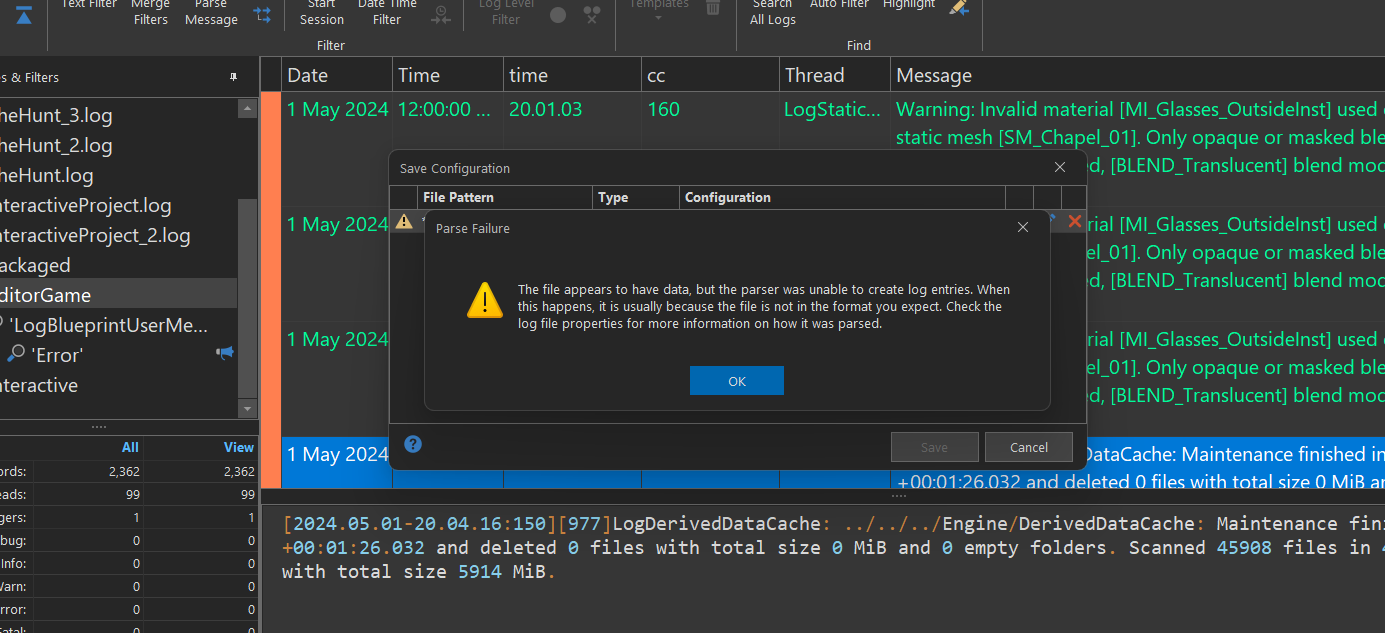
It does seem the parser is unable to process some lines ,
i know the pattern i use is not perfect but is good enough and worked nicely in the old app version ,
here is a fragment of the mounstrousity of log file i have
[quote]LogInit: Build Configuration: Development
LogInit: Branch Name: ++UE5+Release-5.3
LogInit: Command Line:
LogInit: Base Directory: C:/Program Files/Epic Games/UE_5.3/Engine/Binaries/Win64/
LogInit: Allocator: Mimalloc
LogInit: Installed Engine Build: 1
LogInit: This binary is optimized with LTO: no, PGO: no, instrumented for PGO data collection: no
LogDevObjectVersion: Number of dev versions registered: 36
LogDevObjectVersion: Dev-Blueprints (B0D832E4-1F89-4F0D-ACCF-7EB736FD4AA2): 10
LogDevObjectVersion: Dev-Build (E1C64328-A22C-4D53-A36C-8E866417BD8C): 0
LogDevObjectVersion: Dev-Core (375EC13C-06E4-48FB-B500-84F0262A717E): 4
LogDevObjectVersion: Dev-Editor (E4B068ED-F494-42E9-A231-DA0B2E46BB41): 40
LogDevObjectVersion: Dev-Framework (CFFC743F-43B0-4480-9391-14DF171D2073): 37
LogDevObjectVersion: Dev-Mobile (B02B49B5-BB20-44E9-A304-32B752E40360): 3
LogDevObjectVersion: Dev-Networking (A4E4105C-59A1-49B5-A7C5-40C4547EDFEE): 0
LogDevObjectVersion: Dev-Online (39C831C9-5AE6-47DC-9A44-9C173E1C8E7C): 0
LogDevObjectVersion: Dev-Physics (78F01B33-EBEA-4F98-B9B4-84EACCB95AA2): 20
LogDevObjectVersion: Dev-Platform (6631380F-2D4D-43E0-8009-CF276956A95A): 0
LogDevObjectVersion: Dev-Rendering (12F88B9F-8875-4AFC-A67C-D90C383ABD29): 47
LogDevObjectVersion: Dev-Sequencer (7B5AE74C-D270-4C10-A958-57980B212A5A): 13
LogDevObjectVersion: Dev-VR (D7296918-1DD6-4BDD-9DE2-64A83CC13884): 3
LogDevObjectVersion: Dev-LoadTimes (C2A15278-BFE7-4AFE-6C17-90FF531DF755): 1
LogDevObjectVersion: Private-Geometry (6EACA3D4-40EC-4CC1-B786-8BED09428FC5): 3
LogDevObjectVersion: Dev-AnimPhys (29E575DD-E0A3-4627-9D10-D276232CDCEA): 17
LogDevObjectVersion: Dev-Anim (AF43A65D-7FD3-4947-9873-3E8ED9C1BB05): 15
LogDevObjectVersion: Dev-ReflectionCapture (6B266CEC-1EC7-4B8F-A30B-E4D90942FC07): 1
LogDevObjectVersion: Dev-Automation (0DF73D61-A23F-47EA-B727-89E90C41499A): 1
LogDevObjectVersion: FortniteMain (601D1886-AC64-4F84-AA16-D3DE0DEAC7D6): 111
LogDevObjectVersion: FortniteValkyrie (8DBC2C5B-54A7-43E0-A768-FCBB7DA29060): 2
LogDevObjectVersion: FortniteSeason (5B4C06B7-2463-4AF8-805B-BF70CDF5D0DD): 10
LogDevObjectVersion: FortniteRelease (E7086368-6B23-4C58-8439-1B7016265E91): 11
LogDevObjectVersion: Dev-Enterprise (9DFFBCD6-494F-0158-E221-12823C92A888): 10
LogDevObjectVersion: Dev-Niagara (F2AED0AC-9AFE-416F-8664-AA7FFA26D6FC): 1
LogDevObjectVersion: Dev-Destruction (174F1F0B-B4C6-45A5-B13F-2EE8D0FB917D): 10
LogDevObjectVersion: Dev-Physics-Ext (35F94A83-E258-406C-A318-09F59610247C): 41
LogDevObjectVersion: Dev-PhysicsMaterial-Chaos (B68FC16E-8B1B-42E2-B453-215C058844FE): 1
LogDevObjectVersion: Dev-CineCamera (B2E18506-4273-CFC2-A54E-F4BB758BBA07): 1
LogDevObjectVersion: Dev-VirtualProduction (64F58936-FD1B-42BA-BA96-7289D5D0FA4E): 1
LogDevObjectVersion: UE5-Main (697DD581-E64F-41AB-AA4A-51ECBEB7B628): 118
LogDevObjectVersion: UE5-Release (D89B5E42-24BD-4D46-8412-ACA8DF641779): 47
LogDevObjectVersion: UE5-PrivateFrosty (59DA5D52-1232-4948-B878-597870B8E98B): 8
LogDevObjectVersion: UE5-Dev-Cooker (26075A32-730F-4708-88E9-8C32F1599D05): 0
LogDevObjectVersion: Dev-MediaFramework (6F0ED827-A609-4895-9C91-998D90180EA4): 2
LogDevObjectVersion: UE5-Dev-LWCRendering (30D58BE3-95EA-4282-A6E3-B159D8EBB06A): 1
LogInit: Presizing for max 25165824 objects, including 0 objects not considered by GC, pre-allocating 0 bytes for permanent pool.
LogInit: Object subsystem initialized
LogConfig: Set CVar [[con.DebugEarlyDefault:1]]
LogConfig: CVar [[con.DebugLateDefault:1]] deferred - dummy variable created
LogConfig: CVar [[con.DebugLateCheat:1]] deferred - dummy variable created
LogConfig: CVar [[LogNamedEventFilters:Frame *]] deferred - dummy variable created
LogConfig: Set CVar [[r.setres:1280x720]]
LogConfig: CVar [[framepro.ScopeMinTimeMicroseconds:10]] deferred - dummy variable created
LogConfig: CVar [[fx.NiagaraAllowRuntimeScalabilityChanges:1]] deferred - dummy variable created
LogConfig: CVar [[QualityLevelMapping:high]] deferred - dummy variable created
LogConfig: CVar [[r.Occlusion.SingleRHIThreadStall:1]] deferred - dummy variable created
LogConfig: Set CVar [[r.Shadow.DetectVertexShaderLayerAtRuntime:1]]
[2024.04.26-21.32.16:799][ 0]LogConfig: Set CVar [[r.VSync:0]]
[2024.04.26-21.32.16:799][ 0]LogConfig: Set CVar [[r.RHICmdBypass:0]]
[2024.04.26-21.32.16:799][ 0]LogConfig: Applying CVar settings from Section [/Script/Engine.RendererSettings] File [Engine]
[2024.04.26-21.32.16:799][ 0]LogConfig: CVar [[VisualizeCalibrationColorMaterialPath:/Engine/EngineMaterials/PPM_DefaultCalibrationColor.PPM_DefaultCalibrationColor]] deferred - dummy variable created
[2024.04.26-21.32.16:799][ 0]LogConfig: CVar [[VisualizeCalibrationGrayscaleMaterialPath:/Engine/EngineMaterials/PPM_DefaultCalibrationGrayscale.PPM_DefaultCalibrationGrayscale]] deferred - dummy variable created
[2024.04.26-21.32.16:799][ 0]LogConfig: Set CVar [[r.GPUCrashDebugging:1]]
[2024.04.26-21.32.16:799][ 0]LogConfig: CVar [[MaxSkinBones:(Default=65536,PerPlatform=(("Mobile", 256)))]] deferred - dummy variable created
[2024.04.26-21.32.16:799][ 0]LogConfig: Set CVar [[r.GenerateMeshDistanceFields:1]]
[2024.04.26-21.32.16:799][ 0]LogConfig: Set CVar [[r.DynamicGlobalIlluminationMethod:1]]
[2024.04.26-21.32.16:799][ 0]LogConfig: Set CVar [[r.ReflectionMethod:1]]
[2024.04.26-21.32.16:799][ 0]LogConfig: Set CVar [[r.Shadow.Virtual.Enable:1]]
[2024.04.26-21.32.16:799][ 0]LogConfig: Set CVar [[r.DefaultFeature.AutoExposure.ExtendDefaultLuminanceRange:1]]
[2024.04.26-21.32.16:799][ 0]LogConfig: Set CVar [[r.DefaultFeature.LocalExposure.HighlightContrastScale:0.8]]
[2024.04.26-21.32.16:799][ 0]LogConfig: Set CVar [[r.DefaultFeature.LocalExposure.ShadowContrastScale:0.8]]
[2024.04.26-21.32.16:799][ 0]LogConfig: Set CVar [[r.VirtualTextures:1]]
[2024.04.26-21.33.05:887][ 26]LogStaticMesh: Warning: Invalid material [MI_Glasses_OutsideInst] used on Nanite static mesh [SM_Chapel_01]. Only opaque or masked blend modes are currently supported, [BLEND_Translucent] blend mode was specified.
[2024.04.26-21.33.11:453][532]LogLinker: Warning: [AssetLog] D:\repos\BadTouchGames\interactable_system-Art\InteractiveProject\Content\Blueprints\structures\F_InteractiveLight.uasset: Asset has been saved with empty engine version. The asset will be loaded but may be incompatible.
[2024.04.26-21.33.11:471][532]LogAssetEditorSubsystem: Opening Asset editor for Blueprint /Interactive/bp_LightSwitch.bp_LightSwitch
[2024.04.26-21.33.11:471][532]LogWorldSubsystemInput: UEnhancedInputDeveloperSettings::bEnableWorldSubsystem is false, the world subsystem will not be created!
[2024.04.26-21.33.11:471][532]LogChaos: FPhysicsSolverBase::AsyncDt:-1.000000
[2024.04.26-21.33.11:482][532]LogSlate: Warning: The command 'BlueprintEditorSpawnNodes.AddActorRefAction->CommandInfo' has the same default chord as 'BlueprintEditorSpawnNodes.(Class=/Script/BlueprintGraph.K2Node_Knot Key=R Shift=false Ctrl=false Alt=false)' [R]
[2024.04.26-21.33.11:795][532]LogLinker: Warning: [AssetLog] D:\repos\BadTouchGames\interactable_system-Art\InteractiveProject\Content\Blueprints\Utils\bpfn_formatting.uasset: Asset has been saved with empty engine version. The asset will be loaded but may be incompatible.
[2024.04.26-21.33.11:837][532]LogBlueprintEditor: Perf: 0.3 total seconds to load all 8 blueprint libraries in project. Avoid references to content in blueprint libraries to shorten this time.
[2024.04.26-21.33.11:837][532]LogBlueprintEditor: Perf: 0.3 seconds loading: /Game/Blueprints/Utils/bpfn_formatting
[2024.04.26-21.33.12:045][532]LogLinker: Warning: [AssetLog] D:\repos\BadTouchGames\interactable_system-Art\InteractiveProject\Content\Blueprints\Input\CharBuilder\IA_CBwheel.uasset: Asset has been saved with empty engine version. The asset will be loaded but may be incompatible.
[2024.04.26-21.33.12:051][532]LogLinker: Warning: [AssetLog] D:\repos\BadTouchGames\interactable_system-Art\InteractiveProject\Content\Blueprints\Input\CharBuilder\IA_CBMouseMove.uasset: Asset has been saved with empty engine version. The asset will be loaded but may be incompatible.
[2024.04.26-21.33.12:060][532]LogLinker: Warning: [AssetLog] D:\repos\BadTouchGames\interactable_system-Art\InteractiveProject\Content\Blueprints\Input\CharBuilder\IA_CBMouseDown.uasset: Asset has been saved with empty engine version. The asset will be loaded but may be incompatible.
[2024.04.26-21.33.12:071][532]LogLinker: Warning: [AssetLog] D:\repos\BadTouchGames\interactable_system-Art\InteractiveProject\Content\Blueprints\Input\Actions\IA_Shoot.uasset: Asset has been saved with empty engine version. The asset will be loaded but may be incompatible.
[2024.04.26-21.33.12:186][532]LogLinker: Warning: [AssetLog] D:\repos\BadTouchGames\interactable_system-Art\InteractiveProject\Content\Blueprints\structures\E_PlayerRole.uasset: Asset has been saved with empty engine version. The asset will be loaded but may be incompatible.
[2024.04.26-21.33.12:193][532]LogLinker: Warning: [AssetLog] D:\repos\BadTouchGames\interactable_system-Art\InteractiveProject\Content\Blueprints\structures\E_CharacterBodyType.uasset: Asset has been saved with empty engine version. The asset will be loaded but may be incompatible.
[2024.04.26-21.33.12:360][532]LogAssetEditorSubsystem: Opening Asset editor for Blueprint /Game/Blueprints/Lobby/PlayerController_Lobby.PlayerController_Lobby
[2024.04.26-21.33.12:361][532]LogWorldSubsystemInput: UEnhancedInputDeveloperSettings::bEnableWorldSubsystem is false, the world subsystem will not be created!
[2024.04.26-21.33.12:361][532]LogChaos: FPhysicsSolverBase::AsyncDt:-1.000000[/quote]
here is the message from the warning icon
It does seem the parser is unable to process some lines ,
i know the pattern i use is not perfect but is good enough and worked nicely in the old app version ,
here is a fragment of the mounstrousity of log file i have
[quote]LogInit: Build Configuration: Development
LogInit: Branch Name: ++UE5+Release-5.3
LogInit: Command Line:
LogInit: Base Directory: C:/Program Files/Epic Games/UE_5.3/Engine/Binaries/Win64/
LogInit: Allocator: Mimalloc
LogInit: Installed Engine Build: 1
LogInit: This binary is optimized with LTO: no, PGO: no, instrumented for PGO data collection: no
LogDevObjectVersion: Number of dev versions registered: 36
LogDevObjectVersion: Dev-Blueprints (B0D832E4-1F89-4F0D-ACCF-7EB736FD4AA2): 10
LogDevObjectVersion: Dev-Build (E1C64328-A22C-4D53-A36C-8E866417BD8C): 0
LogDevObjectVersion: Dev-Core (375EC13C-06E4-48FB-B500-84F0262A717E): 4
LogDevObjectVersion: Dev-Editor (E4B068ED-F494-42E9-A231-DA0B2E46BB41): 40
LogDevObjectVersion: Dev-Framework (CFFC743F-43B0-4480-9391-14DF171D2073): 37
LogDevObjectVersion: Dev-Mobile (B02B49B5-BB20-44E9-A304-32B752E40360): 3
LogDevObjectVersion: Dev-Networking (A4E4105C-59A1-49B5-A7C5-40C4547EDFEE): 0
LogDevObjectVersion: Dev-Online (39C831C9-5AE6-47DC-9A44-9C173E1C8E7C): 0
LogDevObjectVersion: Dev-Physics (78F01B33-EBEA-4F98-B9B4-84EACCB95AA2): 20
LogDevObjectVersion: Dev-Platform (6631380F-2D4D-43E0-8009-CF276956A95A): 0
LogDevObjectVersion: Dev-Rendering (12F88B9F-8875-4AFC-A67C-D90C383ABD29): 47
LogDevObjectVersion: Dev-Sequencer (7B5AE74C-D270-4C10-A958-57980B212A5A): 13
LogDevObjectVersion: Dev-VR (D7296918-1DD6-4BDD-9DE2-64A83CC13884): 3
LogDevObjectVersion: Dev-LoadTimes (C2A15278-BFE7-4AFE-6C17-90FF531DF755): 1
LogDevObjectVersion: Private-Geometry (6EACA3D4-40EC-4CC1-B786-8BED09428FC5): 3
LogDevObjectVersion: Dev-AnimPhys (29E575DD-E0A3-4627-9D10-D276232CDCEA): 17
LogDevObjectVersion: Dev-Anim (AF43A65D-7FD3-4947-9873-3E8ED9C1BB05): 15
LogDevObjectVersion: Dev-ReflectionCapture (6B266CEC-1EC7-4B8F-A30B-E4D90942FC07): 1
LogDevObjectVersion: Dev-Automation (0DF73D61-A23F-47EA-B727-89E90C41499A): 1
LogDevObjectVersion: FortniteMain (601D1886-AC64-4F84-AA16-D3DE0DEAC7D6): 111
LogDevObjectVersion: FortniteValkyrie (8DBC2C5B-54A7-43E0-A768-FCBB7DA29060): 2
LogDevObjectVersion: FortniteSeason (5B4C06B7-2463-4AF8-805B-BF70CDF5D0DD): 10
LogDevObjectVersion: FortniteRelease (E7086368-6B23-4C58-8439-1B7016265E91): 11
LogDevObjectVersion: Dev-Enterprise (9DFFBCD6-494F-0158-E221-12823C92A888): 10
LogDevObjectVersion: Dev-Niagara (F2AED0AC-9AFE-416F-8664-AA7FFA26D6FC): 1
LogDevObjectVersion: Dev-Destruction (174F1F0B-B4C6-45A5-B13F-2EE8D0FB917D): 10
LogDevObjectVersion: Dev-Physics-Ext (35F94A83-E258-406C-A318-09F59610247C): 41
LogDevObjectVersion: Dev-PhysicsMaterial-Chaos (B68FC16E-8B1B-42E2-B453-215C058844FE): 1
LogDevObjectVersion: Dev-CineCamera (B2E18506-4273-CFC2-A54E-F4BB758BBA07): 1
LogDevObjectVersion: Dev-VirtualProduction (64F58936-FD1B-42BA-BA96-7289D5D0FA4E): 1
LogDevObjectVersion: UE5-Main (697DD581-E64F-41AB-AA4A-51ECBEB7B628): 118
LogDevObjectVersion: UE5-Release (D89B5E42-24BD-4D46-8412-ACA8DF641779): 47
LogDevObjectVersion: UE5-PrivateFrosty (59DA5D52-1232-4948-B878-597870B8E98B): 8
LogDevObjectVersion: UE5-Dev-Cooker (26075A32-730F-4708-88E9-8C32F1599D05): 0
LogDevObjectVersion: Dev-MediaFramework (6F0ED827-A609-4895-9C91-998D90180EA4): 2
LogDevObjectVersion: UE5-Dev-LWCRendering (30D58BE3-95EA-4282-A6E3-B159D8EBB06A): 1
LogInit: Presizing for max 25165824 objects, including 0 objects not considered by GC, pre-allocating 0 bytes for permanent pool.
LogInit: Object subsystem initialized
LogConfig: Set CVar [[con.DebugEarlyDefault:1]]
LogConfig: CVar [[con.DebugLateDefault:1]] deferred - dummy variable created
LogConfig: CVar [[con.DebugLateCheat:1]] deferred - dummy variable created
LogConfig: CVar [[LogNamedEventFilters:Frame *]] deferred - dummy variable created
LogConfig: Set CVar [[r.setres:1280x720]]
LogConfig: CVar [[framepro.ScopeMinTimeMicroseconds:10]] deferred - dummy variable created
LogConfig: CVar [[fx.NiagaraAllowRuntimeScalabilityChanges:1]] deferred - dummy variable created
LogConfig: CVar [[QualityLevelMapping:high]] deferred - dummy variable created
LogConfig: CVar [[r.Occlusion.SingleRHIThreadStall:1]] deferred - dummy variable created
LogConfig: Set CVar [[r.Shadow.DetectVertexShaderLayerAtRuntime:1]]
[2024.04.26-21.32.16:799][ 0]LogConfig: Set CVar [[r.VSync:0]]
[2024.04.26-21.32.16:799][ 0]LogConfig: Set CVar [[r.RHICmdBypass:0]]
[2024.04.26-21.32.16:799][ 0]LogConfig: Applying CVar settings from Section [/Script/Engine.RendererSettings] File [Engine]
[2024.04.26-21.32.16:799][ 0]LogConfig: CVar [[VisualizeCalibrationColorMaterialPath:/Engine/EngineMaterials/PPM_DefaultCalibrationColor.PPM_DefaultCalibrationColor]] deferred - dummy variable created
[2024.04.26-21.32.16:799][ 0]LogConfig: CVar [[VisualizeCalibrationGrayscaleMaterialPath:/Engine/EngineMaterials/PPM_DefaultCalibrationGrayscale.PPM_DefaultCalibrationGrayscale]] deferred - dummy variable created
[2024.04.26-21.32.16:799][ 0]LogConfig: Set CVar [[r.GPUCrashDebugging:1]]
[2024.04.26-21.32.16:799][ 0]LogConfig: CVar [[MaxSkinBones:(Default=65536,PerPlatform=(("Mobile", 256)))]] deferred - dummy variable created
[2024.04.26-21.32.16:799][ 0]LogConfig: Set CVar [[r.GenerateMeshDistanceFields:1]]
[2024.04.26-21.32.16:799][ 0]LogConfig: Set CVar [[r.DynamicGlobalIlluminationMethod:1]]
[2024.04.26-21.32.16:799][ 0]LogConfig: Set CVar [[r.ReflectionMethod:1]]
[2024.04.26-21.32.16:799][ 0]LogConfig: Set CVar [[r.Shadow.Virtual.Enable:1]]
[2024.04.26-21.32.16:799][ 0]LogConfig: Set CVar [[r.DefaultFeature.AutoExposure.ExtendDefaultLuminanceRange:1]]
[2024.04.26-21.32.16:799][ 0]LogConfig: Set CVar [[r.DefaultFeature.LocalExposure.HighlightContrastScale:0.8]]
[2024.04.26-21.32.16:799][ 0]LogConfig: Set CVar [[r.DefaultFeature.LocalExposure.ShadowContrastScale:0.8]]
[2024.04.26-21.32.16:799][ 0]LogConfig: Set CVar [[r.VirtualTextures:1]]
[2024.04.26-21.33.05:887][ 26]LogStaticMesh: Warning: Invalid material [MI_Glasses_OutsideInst] used on Nanite static mesh [SM_Chapel_01]. Only opaque or masked blend modes are currently supported, [BLEND_Translucent] blend mode was specified.
[2024.04.26-21.33.11:453][532]LogLinker: Warning: [AssetLog] D:\repos\BadTouchGames\interactable_system-Art\InteractiveProject\Content\Blueprints\structures\F_InteractiveLight.uasset: Asset has been saved with empty engine version. The asset will be loaded but may be incompatible.
[2024.04.26-21.33.11:471][532]LogAssetEditorSubsystem: Opening Asset editor for Blueprint /Interactive/bp_LightSwitch.bp_LightSwitch
[2024.04.26-21.33.11:471][532]LogWorldSubsystemInput: UEnhancedInputDeveloperSettings::bEnableWorldSubsystem is false, the world subsystem will not be created!
[2024.04.26-21.33.11:471][532]LogChaos: FPhysicsSolverBase::AsyncDt:-1.000000
[2024.04.26-21.33.11:482][532]LogSlate: Warning: The command 'BlueprintEditorSpawnNodes.AddActorRefAction->CommandInfo' has the same default chord as 'BlueprintEditorSpawnNodes.(Class=/Script/BlueprintGraph.K2Node_Knot Key=R Shift=false Ctrl=false Alt=false)' [R]
[2024.04.26-21.33.11:795][532]LogLinker: Warning: [AssetLog] D:\repos\BadTouchGames\interactable_system-Art\InteractiveProject\Content\Blueprints\Utils\bpfn_formatting.uasset: Asset has been saved with empty engine version. The asset will be loaded but may be incompatible.
[2024.04.26-21.33.11:837][532]LogBlueprintEditor: Perf: 0.3 total seconds to load all 8 blueprint libraries in project. Avoid references to content in blueprint libraries to shorten this time.
[2024.04.26-21.33.11:837][532]LogBlueprintEditor: Perf: 0.3 seconds loading: /Game/Blueprints/Utils/bpfn_formatting
[2024.04.26-21.33.12:045][532]LogLinker: Warning: [AssetLog] D:\repos\BadTouchGames\interactable_system-Art\InteractiveProject\Content\Blueprints\Input\CharBuilder\IA_CBwheel.uasset: Asset has been saved with empty engine version. The asset will be loaded but may be incompatible.
[2024.04.26-21.33.12:051][532]LogLinker: Warning: [AssetLog] D:\repos\BadTouchGames\interactable_system-Art\InteractiveProject\Content\Blueprints\Input\CharBuilder\IA_CBMouseMove.uasset: Asset has been saved with empty engine version. The asset will be loaded but may be incompatible.
[2024.04.26-21.33.12:060][532]LogLinker: Warning: [AssetLog] D:\repos\BadTouchGames\interactable_system-Art\InteractiveProject\Content\Blueprints\Input\CharBuilder\IA_CBMouseDown.uasset: Asset has been saved with empty engine version. The asset will be loaded but may be incompatible.
[2024.04.26-21.33.12:071][532]LogLinker: Warning: [AssetLog] D:\repos\BadTouchGames\interactable_system-Art\InteractiveProject\Content\Blueprints\Input\Actions\IA_Shoot.uasset: Asset has been saved with empty engine version. The asset will be loaded but may be incompatible.
[2024.04.26-21.33.12:186][532]LogLinker: Warning: [AssetLog] D:\repos\BadTouchGames\interactable_system-Art\InteractiveProject\Content\Blueprints\structures\E_PlayerRole.uasset: Asset has been saved with empty engine version. The asset will be loaded but may be incompatible.
[2024.04.26-21.33.12:193][532]LogLinker: Warning: [AssetLog] D:\repos\BadTouchGames\interactable_system-Art\InteractiveProject\Content\Blueprints\structures\E_CharacterBodyType.uasset: Asset has been saved with empty engine version. The asset will be loaded but may be incompatible.
[2024.04.26-21.33.12:360][532]LogAssetEditorSubsystem: Opening Asset editor for Blueprint /Game/Blueprints/Lobby/PlayerController_Lobby.PlayerController_Lobby
[2024.04.26-21.33.12:361][532]LogWorldSubsystemInput: UEnhancedInputDeveloperSettings::bEnableWorldSubsystem is false, the world subsystem will not be created!
[2024.04.26-21.33.12:361][532]LogChaos: FPhysicsSolverBase::AsyncDt:-1.000000[/quote]
Posted on May 2, 2024 at 8:09 AM
I think the problem is probably your date format. LogViewPlus can't detect your timestamp automatically, so needs manual configuration.
I am able to get a good parse with:
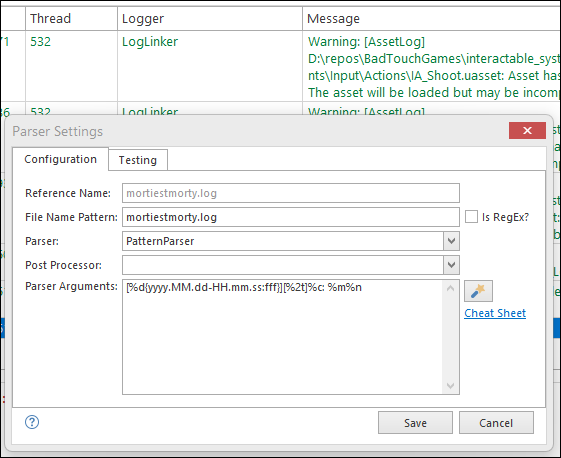
Once you have the parser configured correctly, I think all of the other issues should go away. Also, check and make sure your file name pattern makes sense.
Hope that helps,
Toby
I am able to get a good parse with:
[%d{yyyy.MM.dd-HH.mm.ss:fff}][%t]%c: %m%nOnce you have the parser configured correctly, I think all of the other issues should go away. Also, check and make sure your file name pattern makes sense.
Hope that helps,
Toby
Posted on May 2, 2024 at 5:03 PM
hi
i have to mention i really appreciate your support,
here is a video with the suggested changes on the parser and file name pattern,
it still shows the config dialog, i found only one file is the one causing the problem (i remove it in the video)
https://www.youtube.com/watch?v=JBG_Ac_9D68
and this video shows the columns not being hidded after restarting the app
it seems it works for log files but not for merged ones
https://www.youtube.com/watch?v=lqjK1_EZwqo
i have to mention i really appreciate your support,
here is a video with the suggested changes on the parser and file name pattern,
it still shows the config dialog, i found only one file is the one causing the problem (i remove it in the video)
https://www.youtube.com/watch?v=JBG_Ac_9D68
and this video shows the columns not being hidded after restarting the app
it seems it works for log files but not for merged ones
https://www.youtube.com/watch?v=lqjK1_EZwqo
Posted on May 2, 2024 at 5:36 PM
Thanks for the videos - it really helps to see where the issue is.
First a pro tip: Just drag and drop the columns to remove them. Drag until an X appears and then release the mouse. It is much easier. :)
Before you take the steps outlined below, save your workspace. This will make it easier to recover after you have completed the steps below.
In your videos, you have two file types TheHunt and InteractiveProject. Then you have also have some merge files. Column information is saved with the parser configuration. Merged files do not have a parser configuration. So changes made to a merge file view cannot be saved beyond the current session.
To address the issue close all files in your workspace. Now open TheHunt.log. Does it parse correctly? Check the timestamp. In your video, I frequently see the time set to noon - so it looks like the timestamp is not parsing correctly. Go into your parser settings and remove any previously configured parsers if you need to.
Once it is parsing correctly, THEN remove the columns. In future, if you make any changes to TheHunt*.log parser configuration, you will lose your persisted column information.
Now close TheHunt.log and open InteractiveProject.log. Repeat the steps outlined above. Basically, you want to get a single file parsing and looking correct before you start working with merge files / multiple files.
Once that's done, you can reopen your workspace. All files should parse correctly - if not, try to identify the specific file that did not parse and determine the reason why. You can use F5 to refresh the log file. Internally, this will close and reopen the file so the behaviour is very similar to restarting the application.
Because your merge file uses the same parser for all files, LogViewPlus should be able to use the cached column information for the common configuration. However, changes made to column in the merge file will not be persisted.
Hope that helps,
Toby
First a pro tip: Just drag and drop the columns to remove them. Drag until an X appears and then release the mouse. It is much easier. :)
Before you take the steps outlined below, save your workspace. This will make it easier to recover after you have completed the steps below.
In your videos, you have two file types TheHunt and InteractiveProject. Then you have also have some merge files. Column information is saved with the parser configuration. Merged files do not have a parser configuration. So changes made to a merge file view cannot be saved beyond the current session.
To address the issue close all files in your workspace. Now open TheHunt.log. Does it parse correctly? Check the timestamp. In your video, I frequently see the time set to noon - so it looks like the timestamp is not parsing correctly. Go into your parser settings and remove any previously configured parsers if you need to.
Once it is parsing correctly, THEN remove the columns. In future, if you make any changes to TheHunt*.log parser configuration, you will lose your persisted column information.
Now close TheHunt.log and open InteractiveProject.log. Repeat the steps outlined above. Basically, you want to get a single file parsing and looking correct before you start working with merge files / multiple files.
Once that's done, you can reopen your workspace. All files should parse correctly - if not, try to identify the specific file that did not parse and determine the reason why. You can use F5 to refresh the log file. Internally, this will close and reopen the file so the behaviour is very similar to restarting the application.
Because your merge file uses the same parser for all files, LogViewPlus should be able to use the cached column information for the common configuration. However, changes made to column in the merge file will not be persisted.
Hope that helps,
Toby
Posted on May 3, 2024 at 10:18 PM
hi
it did work , columns keep hidded
though after that i tried to organize by merging the files but for 2 specific files their merge is not saved
when i restart the app only the merge of those two files gets removed
it did work , columns keep hidded
though after that i tried to organize by merging the files but for 2 specific files their merge is not saved
when i restart the app only the merge of those two files gets removed
Posted on May 4, 2024 at 4:19 PM
Glad that worked - thanks for letting me know.
Merge files exist only in memory. There can be a number of reasons why a merge file is not recreated with the workspace. This usually happens when one of the initial conditions is not met (such as a file being unavailable). It may also be worth manually saving your workspace as it could be a timing issue with the save.
Hope that helps,
Toby
Merge files exist only in memory. There can be a number of reasons why a merge file is not recreated with the workspace. This usually happens when one of the initial conditions is not met (such as a file being unavailable). It may also be worth manually saving your workspace as it could be a timing issue with the save.
Hope that helps,
Toby
This topic is archived and cannot receive new replies.