|
Brad Konia
|
|
|
Group: Forum Members
Posts: 70,
Visits: 111
|
I'm using an SFTP monitor to monitor a directory. When I created the monitor, it found all the files and they all showed up in the File Transfers pane, with status "Monitoring". They also showed up in the Log Files & Filters pane.
For the most part, this works fine, but sometimes, files just disappear from either or both panes, even though they still exist on the server. Sometimes they come back after a while and other times, I have to close and reopen the workspace to get them back. For example, I currently have a file that exists in the directory. It disappeared from both panes, but now, a few minutes later, it's showing up in the File Transfers pane, but it's still missing from the Log Files & Filters Pane.
|
|
|
|
|
LogViewPlus Support
|
|
|
Group: Moderators
Posts: 1.3K,
Visits: 4.6K
|
Hi Brad. Thanks for reporting this issue - it sounds like very strange behavior. My first thought is that LogViewPlus is losing track of the file for some reason and then the workspace is getting corrupted with reloads (old / bad file vs the refreshed / good file). If this is true, restarting LogViewPlus might help temporarily. Can you please check your Tail & Scroll settings to make sure that the transfer is not timing out? Also, if you right-click in the file transfers pane, there should be an option to "Show Transfer Log". It would be interesting to monitor this log to see if the SFTP server is reporting any problems. Hope that helps, Toby
|
|
|
|
|
Brad Konia
|
|
|
Group: Forum Members
Posts: 70,
Visits: 111
|
OK, a couple of things:
1. In Tail & Scroll Settings, it was set to stop monitoring after 4 hours. I'm not sure why that would be the default setting, but anyway, I changed it to Never.
2. In the transfer log, I do see some connection errors, from when my Internet went down, but then later on when the Internet came back online, it shows that it successfuly reconnected.I can send you the log, if that would be helpful.
|
|
|
|
|
LogViewPlus Support
|
|
|
Group: Moderators
Posts: 1.3K,
Visits: 4.6K
|
Thanks Brad.
The idea behind the timeout is that if you leave work for the day, you may not want to keep monitoring the same file - as polling the file does use some server resources. 4 hours is a bit of an arbitrary default, but it is hopefully enough time to complete analysis of a given log file. 8 - 10 hours might be a better default as 4 does occasionally lead to confusion.
I am not sure the transfer log would help right now, but thanks for the offer. What I would like to do is understand what happens when the log file 'disappears'. I believe that if we can get to the bottom of that issue - it will be easier to resolve the workspace corruption problem.
Can you monitor the log file and see what the SFTP log says if the issue happens again? If the log file is being rolled or replaced, that may also be leading to some confusion. Something to watch out for.
Toby
|
|
|
|
|
Brad Konia
|
|
|
Group: Forum Members
Posts: 70,
Visits: 111
|
It's definitely not updating in real time. For example, I deleted a file from the directory about 5 - 10 minutes ago, but it's still showing up in both panes.There seems to be something buggy with the directory monitoring function.
|
|
|
|
|
Brad Konia
|
|
|
Group: Forum Members
Posts: 70,
Visits: 111
|
These are the files that are currently in the directory: 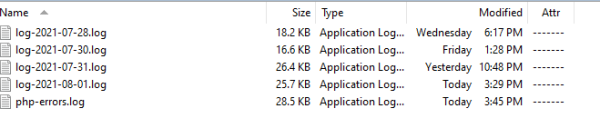 And this is what LVP shows: 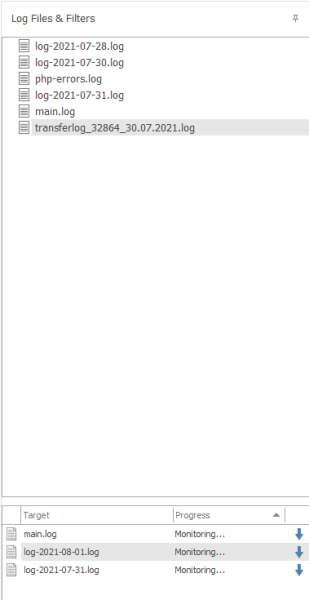 It makes no sense. Why is main.log showing up in both panes, after it was deleted from the server? Why does 08-01.log show up in the bottom pane, but not the top pane? Why is the bottom pane missing 07-28.log and 07-30.log? It's very difficul to work with this when nothing matches up.
|
|
|
|
|
LogViewPlus Support
|
|
|
Group: Moderators
Posts: 1.3K,
Visits: 4.6K
|
Hi Brad, When LogViewPlus monitors files, the goal is not mirroring the file. The goal is to collect all log entries written to the file since monitoring started. If a log file is deleted, from the server monitoring should continue in case the file is recreated (as is often the case with log files). If you want log entries to more closely mirror the log file, consider the "Clear all log entries when the log file is rolled" option in the Tail & Scroll settings. However, note that if this setting is enabled, the file will continue to be monitored even if it has been removed from the server. The only issue I can see from the from the screenshots above is that 08-01 is missing from the Log Files view, but shown in Monitoring. That is very strange because closing the file should stop monitoring. As mentioned above, I suspect your workspace has gotten corrupted through refreshes and LogViewPlus is confusing an old instance of the file with a newer, refreshed instance. I assume the other files shown have timed out. It is difficult to know what the problem is from the screenshot. That is why I would like to try and narrow down the problem to what happened when the issues first started. To do this, it may be necessary to restart LogViewPlus. Toby
|
|
|
|
|
Brad Konia
|
|
|
Group: Forum Members
Posts: 70,
Visits: 111
|
When LogViewPlus monitors files, the goal is not mirroring the file. The goal is to collect all log entries written to the file since monitoring started. If a log file is deleted, from the server monitoring should continue in case the file is recreated (as is often the case with log files).
Understood. The problem is, the top pane doesn't give any indication of whether the file exists and the bottom pane displays a blank filename. This is inconsistent and extremely confusing. Instead, I'd suggest it continue displaying the file name in both panes, but dim and/or italicize the text and show a warning icon next to the file name, When hovering over the icon, it should display a tooltip like "This file no longer exists in the directory". There shoujld also be an option in the context menu to remove the file from the list, which should remove it from both panes.
Likewise, if monitoring times out on a file, instead of removing the file from the list, it should be displayed with a warning icon, to indicate that it's no longer being monitored. When you hover over this icon, it should display a tooltip like "This file is no longer being monitored because it has exceeded the monitoring time limit. To change this limit, navigate to Settings->Application->Tab & Scroll.". You could also provide a context menu option to restart monitoring.
|
|
|
|
|
LogViewPlus Support
|
|
|
Group: Moderators
Posts: 1.3K,
Visits: 4.6K
|
I agree - indicators and tool-tips are clearly a much better way to handle environment status notifications. Thanks for pointing this out Brad. We are planning a release this week, but I will look into making these changes for the following release in a 2 - 3 months.
You can remove a file from the monitoring list and it will not modify your view (but the target will no longer receive updates). If you remove a file from your view, it should be removed from the monitoring list as well. This is why I mentioned that it is file "08-01.log" in your screenshots which clearly shows that something is wrong. You may have stopped monitoring the other files, but "08-01.log" should be in your view if it is in the monitoring list. It appears to have been disconnected from the view and I am not sure how this occurred. I suspect it occurred during a directory monitor or workspace refresh, but it would be good to try to narrow the problem down.
|
|
|
|
|
Brad Konia
|
|
|
Group: Forum Members
Posts: 70,
Visits: 111
|
There's a related issue that's happened to me several times now. The first time it happened, I thought it was a fluke, but now it just happened again. Here are the steps to replicate it:
1. Create a new file called debug.log in an SFTP directoy that's already being monitored.
2. The file shows up in both panes.
3. Since the file is a custom JSON format, the dialog automatically opens for you to configure the template.
4. Using the wizard, configure it as custom JSON. Then save the template.
Here's where it gets interesting. When you click the Save button, the dialog closes and the LVP main window minimizes. I don't know why closing a dialog would cause the entire application to minimize, but that's what it does. After I click on the taskbar icon to bring the window back, I notice that debug.log is no longer shown in the top pane. However, it still appears in the bottom pane.
No idea what's going on here. The file is definitely in the directory and it was displayed in the top pane prior to creating the template.
|
|
|
|